Slite vs Slab: What You Get at Each Price
Compare Slite and Slab pricing plan by plan, from the free tier to enterprise.

TL;DR
- Slab starts free for up to 10 users. Slite has no free plan, only a 14-day trial.
- Entry paid pricing is $6.67 per user on Slab against $10 per user on Slite, both billed annually.
- SSO costs $12.50 per user on Slab and $20 per user on Slite.
- Audit logs need an enterprise contract on both platforms.
- Neither tool lets you choose where your documents are stored.
Slite has dropped its free plan and rebuilt its tiers into Basic and Pro. Slab has added a set of AI features: AI Autofix, AI Predict, and AI Ask.
Every price, limit, and feature below comes from Slab's pricing and security pages and Slite's pricing page. Pricing pages change, so confirm the numbers with each vendor before you sign anything.
We're going to walk this comparison in price order, so you'll see exactly what each dollar buys you.
What changed in 2026
Slite now runs three plans: Basic at $10 per user per month, Pro at $20, and a custom-priced Enterprise tier. In place of the old free tier there's a 14-day trial that opens up everything in Basic and Pro, with no credit card required.
On Slab, the AI sits on the paid plans. Autofix comes in at the Startup plan, $6.67 per user per month, and Predict and Ask arrive with Business at $12.50. The free plan doesn't include any of them.
Both companies hold SOC 2 Type II certification. Slab also publishes a SOC 3 report and states that it complies with GDPR.
Quick Comparison Table
|
Feature |
Slab |
Slite |
|
Free plan |
Up to 10 users |
None, 14-day trial |
|
Entry paid |
$6.67/user/mo |
$10/user/mo |
|
Next tier |
$12.50/user/mo |
$20/user/mo |
|
SSO |
$6.67 (SSO), $12.50 (SAML) |
$20 (OpenID) |
|
SCIM |
$12.50 |
Enterprise |
|
Audit logs |
Enterprise, 100-user minimum |
Enterprise |
|
Certification |
SOC 2 Type 2, SOC 3, GDPR |
SOC 2 Type II, HIPAA at Enterprise |
|
Self-hosting |
No |
No |
All prices are billed annually.
Free: Slab only
If you want to run a wiki without paying for it, Slab is your only option.
What the free plan gives you
- Up to 10 users, plus guests
- Unlimited posts and topics
- Real-time collaboration
- Templates
- Post Verification, a governance feature that keeps important documentation accurate and up to date by putting it through regular internal review
- Unified search across Slab and your connected apps, including Google Drive, Slack, GitHub, Asana, and Jira
- 10MB attachments
- 90 days of version history
- 30 days of usage analytics
- 10 standard integrations
That's a working wiki, and a small team can run on it for a long time without hitting a wall.
What Slite gives you instead of a free plan
Nothing free, but you do get a 14-day trial that opens up both Basic and Pro without a credit card. It's enough time to move a few real documents in and see whether your team writes in it. It isn't something you can run a company on.
$6.67 per user: Slab Startup
Your eleventh hire moves the whole workspace here, since the free plan stops at 10 users. For a team of 12, that's about $80 a month, and Slab offers a 30-day money-back guarantee if you're not satisfied.
What you get
- Unlimited users
- 3 guests per user
- 25MB attachments
- 365 days of version history
- Private topics, which keep sensitive content hidden from the rest of the company and visible only to the people you choose
- 90 days of usage analytics
- AI Autofix
- Single sign-on
- Unlimited standard integrations
The part people miss
Single sign-on shows up here, at $6.67 per user. Most tools in this category put SSO behind a much higher tier, so if your IT team wants everyone logging in through one identity provider, Slab gets you there more affordably.
Slab also gives the Startup plan away free to verified nonprofit organizations and educational institutions. If your organization outgrows it and needs heavier features, the Business plan comes at half price.
$10 per user: Slite Basic
Slite's entry plan costs about 50 percent more per user than Slab's, and the AI it adds comes with a monthly limit. If Notion is also on your shortlist, our Slite vs Notion comparison covers that matchup separately.
What you get
- Unlimited docs
- Ask, Slite's AI search and answers across your docs, capped at 30 questions per seat each month
- An AI writing assistant
- Doc verification workflow
- Doc ownership, which makes a named person or user group accountable for a document
- The Knowledge Management Panel, which lets you act on lots of documents at once instead of opening them one by one
- Doc insights
- MCP and API access
- 200MB file uploads
- PDF, Markdown, and HTML exports
- SOC 2 Type II
The part teams miss
The AI on Basic comes with a monthly limit. You get 30 Ask questions per seat per month, and 30 AI edits per user per month. For a team that doesn't use Ask too often, that's plenty. But if you're a support team using it as your first stop for every customer question, you'll get through 30 in a week.
Slite doesn't sell extra AI credits separately, so to get past the limit you have to move to Pro at $20 per user, double the Basic price.
Bigger uploads and easier exports
File uploads run to 200MB against Slab's 25MB at a comparable tier. Exports in PDF, Markdown, and HTML are included from the first paid plan, so getting your content back out is a documented feature instead of a support ticket.
$12.50 per user: Slab Business
This is the tier where Slab adds the security and admin features, and it's the one to hold up against Slite Pro.
What you get
- 5 guests per user
- 100MB attachments
- Unlimited version history
- Custom domains
- 365 days of usage analytics
- The full AI set: Autofix, Predict, and Ask
- SAML-based SSO
- SCIM provisioning
- Unlimited standard integrations, plus 3 premium integrations
- GraphQL API
- Webhooks
- Priority support
- An uptime SLA
Why this tier matters in the comparison
At $12.50 per user, Slab Business costs $7.50 less per person than Slite Pro and covers two things Slite reserves for its Enterprise tier: SCIM provisioning and an uptime SLA.
SCIM is the piece that matters most for a growing company. It means your identity provider creates and deactivates Slab accounts automatically as people join and leave, so nobody has to remember to remove access manually. On Slite, you can't buy that without talking to sales.
Unlimited version history arrives here too, so if you need to see what a document said a year ago, this is the tier that keeps it.
Premium integrations also unlock here. Unified search works on every plan, including the free one, but only across standard integrations. Premium ones like Okta, OneLogin, and Zendesk need the Business plan, and you get three of them. If the tool you most want searchable is a premium integration, this is the tier that reaches it.
$20 per user: Slite Pro
Slite's Pro plan is the most expensive self-serve option in this comparison, and the reason to buy it is the agent.
What you get
- Everything in Basic
- The Slite Agent
- Search across your connected tools, including Slack, Jira, Linear, GitHub, Google Drive, HubSpot, Salesforce, and others
- Doc fact-checking with suggested fixes
- Agent workflows
- 50 monthly credits per seat
- OpenID SSO
- A custom domain for public docs
- Unlimited file uploads
- Unlimited AI writing
- Custom assistants
- Automated digests
- Bulk mode
What you're paying for
Slite's pitch at this tier is a knowledge base that maintains itself. The agent watches what your team does across connected tools, spots documents whose claims no longer match reality, and drafts the correction. The suggested changes land in a triage view where a person accepts, adjusts, or dismisses them.
It also answers questions by reading across your connected tools and writing a single response with citations back to the source, instead of handing you a list of links. And it can build documents out of material you already have, turning old Slack threads or support conversations into a structured guide, then suggesting who should own it.
Keeping documentation current is its own job, and most teams only find out how out of date things are when somebody follows an old process. If that's what's costing you time, the agent earns its price.
If it isn't, you're paying $20 per user for a wiki you could get for less. Slite Basic covers writing, organizing, and verifying documents at $10. Slab Startup covers a similar job at $6.67.
One thing to note on the security side: OpenID SSO is the first identity feature Slite offers, and it lands here at $20. Slab gives you SSO at $6.67 and SAML at $12.50.
Slab Enterprise vs Slite Enterprise
Both companies save their heaviest security features for contracts they price individually.
|
Feature |
Slab Enterprise |
Slite Enterprise |
|
Pricing |
Custom |
Custom |
|
User minimum |
At least 100 |
Not published |
|
Audit logs |
Yes |
Yes |
|
SCIM |
Included from Business |
First appears here |
|
HIPAA |
Not published |
Yes, BAA available |
|
Uptime SLA |
Included from Business |
Yes |
|
Support |
Dedicated |
Dedicated account manager |
|
Onboarding |
Not published |
Migration and onboarding support |
The Problem This Creates For Mid-sized Teams
Audit logs sit at the Enterprise tier on both platforms. If you have 40 people and a compliance requirement that says you need a record of who accessed what, that's a problem.
Slab makes this harder by setting a 100-user minimum on Enterprise. A 40-person company can't buy it at all, whatever the budget.
Slite doesn't publish a minimum, so a 40-person team can at least ask. You still can't buy it online, though. You have to talk to their sales team, and you won't know the price until they tell you.
At this level, what matters is whether the platform meets the requirement your security team has already given you.
Slab or Slite: which one fits your team
Slab is a focused and fast wiki.
- Search reaches across the tools you've connected, so people find answers without knowing which tool holds the answer
- Costs less at every comparable tier
- Single sign-on from the entry paid plan at $6.67 per user
- A free plan a small team can run on
Slite is built around automation.
- The agent watches your connected tools and drafts corrections when documents fall behind
- Doc ownership puts a named person or group behind every document
- 200MB file uploads and documented exports in PDF, Markdown, and HTML
- HIPAA compliance and a BAA at the Enterprise tier
Pick Slab if the job is storing and finding what your team writes, and you want to spend less. Pick Slite if your documentation keeps drifting out of date and nobody has time to police it.
What neither Slab nor Slite offers
Both are cloud-only
You can't run Slite or Slab on your own server. Neither company publishes a data residency option, so you can't choose which country your documents sit in. Slab states that it's hosted on Google Cloud Platform, while Slite doesn't publish a hosting location at all.
Both hold SOC 2 Type II certification, and that's important because it describes how carefully the vendor runs its own security controls. What it doesn't tell you is where your documents physically live, or who at the vendor could reach them.
Why that matters to some teams
For a lot of companies, none of this is a problem. You're storing onboarding guides and meeting notes, and a certified vendor on a major cloud is a sensible place for them.
It becomes a problem when someone asks a question you can't answer.
- A client sends a security questionnaire asking where your data is stored
- A regulator asks who has access
- A public institution has rules about data staying inside national borders
At that point, "our vendor is SOC 2 certified" is an answer about the vendor, not about you.
The self-hosted option
Running your own wiki changes the answer, and it comes down to three things:
- Data never leaves infrastructure you control
- You define your own compliance posture, including access controls, encryption, and retention, instead of inheriting a vendor's
- Hosting, backups, upgrades, and security patching become your IT team's responsibility
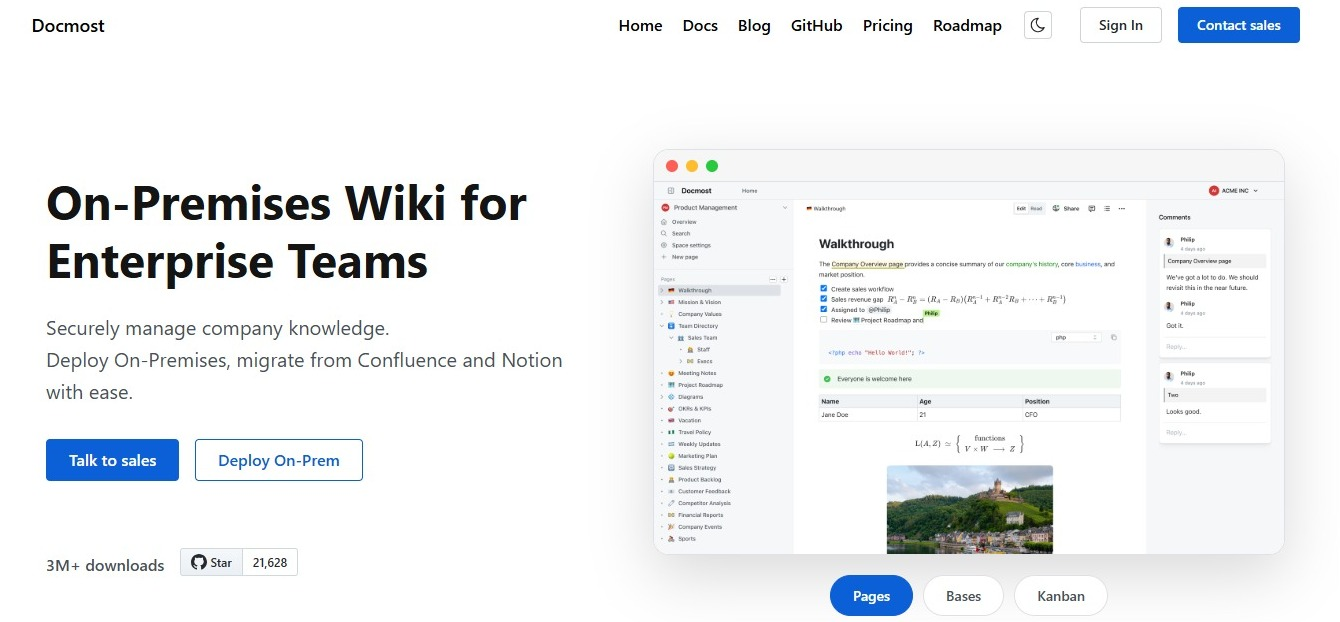
Docmost is an open-source wiki you host yourself. You get spaces, permissions, real-time collaborative editing, and page history, running on your own infrastructure. If Slab or Slite can't meet your team's security requirements, take a look.
Frequently asked questions
- Does Slite still have a free plan?
No. Slite now offers Basic at $10 per user per month, Pro at $20, and a custom-priced Enterprise tier. What used to be a free plan has been replaced by a 14-day trial that covers Basic and Pro features, with no credit card required.
- Can I export my content out of Slite?
Yes. Slite lists PDF, Markdown, and HTML exports on all three of its plans, including Basic at $10 per user per month. Markdown is the one that matters most if you ever move to another tool, since most wikis accept it.
- Can I export my content out of Slab?
Slab doesn't list export formats on its pricing page, so ask their support team before you commit. Whichever tool you pick, test an export early instead of finding out how it works on the day you're leaving. Our wiki buyer's checklist walks through how to run that test during a trial.
- I move my content between Slite and Slab?
Neither company publishes a direct importer for the other, so there's no one-click path between them. The realistic route is exporting to Markdown and importing that into the new tool. Expect to redo your permissions and folder structure by hand either way, since those don't travel with the files.
- Will either company sign a BAA?
Slite states that it's HIPAA compliant and can sign a BAA for eligible plans, which sits at the Enterprise tier. Slab's security page lists SOC 2 Type 2, SOC 3, and GDPR compliance, and HIPAA isn't among them. That doesn't mean Slab will refuse, since some vendors handle BAAs through enterprise contracts without advertising it, so ask their sales team if you need one.
- What happens to my documents if I stop paying?
Both are subscription products, so access ends when the subscription does. Export your content before you cancel, not after. It's also why you should check export options while you're evaluating, not two years later.
- Can Slite or Slab be self-hosted?
No. Both are cloud-only, and neither company offers an on-premises version. If running the software on your own infrastructure is a requirement, you'll need an open-source, self-hosted wiki instead.
Choosing between Slab, Slite, and self-hosting
Slab is cheaper at every comparable tier, includes SSO earlier, and has a free plan that a small team can live on. Slite costs more and spends the difference on keeping your documentation current. Neither one lets you decide where your documents are stored.
If that last point is the one you can't get past, Docmost runs on your own infrastructure and is open source. Start a trial or talk to our team about what a self-hosted setup would look like for you.