Slab vs Confluence: Which Wiki Fits Your Team?
See how Slab and Confluence compare on pricing, editing, search, permissions, and hosting.

TL;DR
- Slab is a focused internal wiki. Confluence is a wiki that lives inside the wider Atlassian stack.
- Both free plans stop at 10 users. Slab's gives you unlimited posts, unified search, and single sign on. Confluence's gives you pages, spaces, templates, and 2 GB of storage.
- Slab runs $8 to $15 per user per month. Confluence Cloud runs $5.42 to $10.44, but single sign on isn't included on any plan, so add $4.20 per user for Atlassian Guard if you need it.
- Slab is cloud only. Confluence gives you Cloud and is retiring its Data Center.
- If your team already runs Jira, Confluence is the shorter path. But if you want a wiki and nothing else, Slab is a better option.
If you're comparing Slab and Confluence, you're probably asking which one is the better wiki. It depends less on the tools than on your situation. Confluence is a wiki attached to a much bigger system. Slab is a wiki on its own. Which one fits depends on whether you want that bigger system.
Confluence was built to sit next to Jira. Most of what you're paying for shows up when the rest of your company is already inside Atlassian, with pages linked to issues and one set of users across both products. Slab was built to just be a wiki.
Here's how they compare on pricing, editing, search, permissions, integrations, and hosting.
Quick Comparison
|
Features |
Slab |
Confluence |
|
Free tier |
Up to 10 users, unlimited posts |
Up to 10 users, 2 GB storage |
|
Paid entry price |
$8 per user/month |
$5.42 per user/month |
|
Top standard tier |
$15 on Business |
$10.44 on Premium |
|
AI features |
Tiered: Autofix, Predict, Ask |
Rovo AI (search, chat, agents) from Standard |
|
SSO and provisioning |
SSO on every plan, SAML and SCIM from Business |
Needs Atlassian Guard Standard at $4.20 per user/month on every plan below Enterprise |
|
API access |
GraphQL from Business |
REST API, subject to hourly rate limits |
|
Hosting |
Cloud only |
Cloud, plus Data Center until retirement |
Slab vs Confluence pricing
What Slab costs
Slab runs three published plans, plus a custom Enterprise tier that starts at 100 users.
|
Category |
Free |
Startup |
Business |
Enterprise |
|
Price per user/month |
$0 |
$8 |
$15 |
Custom |
|
Users |
Up to 10 |
Unlimited |
Unlimited |
100 minimum |
|
Guests |
Not included |
3 per user |
5 per user |
Unlimited |
|
Attachment size |
10MB |
25MB |
100MB |
Custom |
|
Version history |
90 days |
365 days |
Unlimited |
Unlimited |
|
AI |
None |
Autofix |
Autofix, Predict, Ask |
Advanced Ask |
|
Security |
SSO |
SSO |
SAML SSO, SCIM |
Audit logs |
|
Integrations |
10 standard |
Unlimited standard |
3 premium, GraphQL, webhooks |
Unlimited premium |
Prices are billed monthly. Paying annually brings Startup down to $6.67 and Business down to $12.50.
The free plan gives you unlimited posts, real-time collaboration, templates, unified search, and single sign on without paying anything. That's unusual on a free plan, and Confluence charges for it separately.
Version history is another line to check. On the free plan, Slab keeps 90 days of history. On Startup it keeps a year. Only Business gets you unlimited history. So if someone asks what a page said two years ago, Business is the plan that can answer.
What Confluence costs
Confluence Cloud runs three published plans, plus an Enterprise tier you have to talk to sales about.
|
Category |
Free |
Standard |
Premium |
|
Price per user/month |
$0 |
$5.42 |
$10.44 |
|
Users |
Up to 10 |
Up to 250,000 per site |
Up to 250,000 per site |
|
Pages and spaces |
Limited |
Limited |
Unlimited |
|
Storage |
2 GB |
250 GB |
Unlimited |
|
Automation |
50 steps per month |
100 steps per user/month |
250 steps per user/month |
|
AI |
None |
Rovo Search, Chat, and Agents |
Rovo Search, Chat, and Agents |
|
Permissions |
Standard |
Advanced permissions |
Plus admin controls and insights |
|
Guest access |
Not included |
Free guests |
Free guests |
|
Support |
Atlassian Community |
9/5 regional support |
24/7 for critical issues |
|
Uptime SLA |
None |
None |
99.9% |
Prices are billed monthly.
The free plan offers 10 users, 2 GB of storage, and community support, which means no support desk. You also get three active whiteboards per person and 50 automation steps a month across the whole subscription, not per user.
Only Premium gives you unlimited pages and spaces. Below that, Atlassian lists them as limited without publishing a number, so you'd need to ask before committing.
With the Standard plan, you get Atlassian's Rovo AI features, guest access at no extra cost, advanced permissions, and real support during business hours.
Which one costs less for your team
Confluence is cheaper per seat until you need single sign on.
On the prices alone, Confluence wins. Standard at $5.42 beats Slab's Startup plan by $2.58 a seat, and Premium at $10.44 beats Slab's Business plan by $4.56.
But single sign on changes that. Slab includes it on every plan, including the free one. Confluence doesn't include it on any published plan, so you add Atlassian Guard Standard at $4.20 per user per month on top of your Confluence seat. That takes Confluence Standard to $9.62 a seat against Slab's $8, and Slab's free plan gives you single sign on for nothing.
If you need SAML and automatic user provisioning, Confluence gets cheaper again. Guard Standard covers enforced single sign on, SCIM provisioning, and API token controls. That puts Confluence Standard plus Guard at $9.62 a seat. Slab only gives you SAML and SCIM on its Business plan, which is $15.
The short version: for small teams that want single sign on without a security budget, Slab is the most affordable option. For teams that need SAML and SCIM properly, Confluence is the cheaper choice, even with Guard added.
Note that Guard is billed per organization, not per app. So if you run other Atlassian products, it isn't only your Confluence users you're paying for. Anyone who can get into Jira, Bitbucket, Trello, or Jira Service Management is billed too.
That said, each person is counted once no matter how many products they use, and anyone on an Enterprise plan isn't charged at all because Guard is already included there.
So if 30 people use your wiki but 80 people are in Jira, you're paying Guard for all 80.
Slab vs Confluence editor
Writing in Slab
Slab keeps writing simple. You get posts, which are the pages themselves, and topics, which are how you group those pages together. You can have as many of both as you want, even on the free plan.
Your team can write in the same post at the same time. There are also templates, so nobody has to start from a blank page every time they write something up.
The one that matters most here is Verification. You can mark a post as needing regular review, and Slab notifies you when that review is due. It sounds minor, but it solves a major wiki problem. After a year or two, nobody can tell which pages give correct information. Verification lets you see quickly whether a page has been checked or left untouched for years.
Writing in Confluence
Confluence organizes content into spaces, and each space holds pages that can nest underneath each other. Teams typically get a space each, and the tree structure inside it is how you keep things findable.
You get three kinds of content:
- Pages are the standard type, and they run on a draft and publish cycle with full version history.
- Live docs skip publishing altogether, so your edits appear to everyone as you type them.
- Blog posts are for announcements and sit in their own section, ordered by date.
Up to 30 people can edit the same page at once. Confluence saves as you write, and your drafts stay private unless you share them.
You can schedule a page to go live at a set date and time, add a comment explaining what changed, notify everyone watching the page, or turn a draft into a live doc. Confluence saves a new version every time you update, and you can compare any two versions side by side or restore an older one.
Macros are available on every plan, including the free one.
On Standard and above, Rovo can write a first draft from a short description and suggest a title for it.
Page owners and admins can also mark a page as verified, which tells readers the content has been checked and is current. It's available on every plan.
Which one is better to write in
Confluence gives you more to work with. You get three content types, scheduled publishing, version comments, and a history you can compare and restore from.
Slab gives you less to learn. You get posts and topics, and that's it. If your team wants to write things down and find them again later, there's nothing to set up before you start.
Both give you a way to mark a page as checked:
- Slab's Verification lets you tag a post for regular review and tells you when that review is due.
- Confluence lets page owners and admins mark a page as verified so readers can see the content has been checked.
Either one answers the question that version history can't, which is whether anyone has confirmed the page is still accurate.
Slab vs Confluence search
Slab's unified search
Slab's search covers Slab and the tools you've connected to it. So when you look for an onboarding checklist, you're searching your wiki and your connected apps at once.
That feature is important because most teams don't keep everything in the wiki. Some of it ends up in Slack, some in Drive, and some in a ticket. A search that only covers the wiki finds only a fraction of what you're looking for.
Unified search is on every plan, including free.
How Confluence search works
Confluence search has its own query syntax, so you can type specific words and symbols into the search field to narrow down what comes back. That's useful once your site is big enough that a plain keyword search returns too much to read through.
Rovo is the AI layer on top of it, and it starts on the Standard plan.
Atlassian also suggests keeping special characters out of your page titles, since pages named that way may not turn up in search.
Which one finds things faster
On the free plans, Slab wins because unified search across your wiki and your connected tools costs nothing, and Confluence Free has no AI search at all.
Once you're paying, the difference is which plan the AI starts on. Confluence gives you Rovo from $5.42 a seat, so search that answers questions instead of returning a list of pages starts at the cheapest paid plan. Slab's equivalent is AI Ask, which answers questions against your knowledge base, and that doesn't arrive until the $15 Business plan.
So if AI search is what you're after, Confluence gives you that for a lot less. But if what you want is one search box that reaches the tools your team already uses, Slab does that on every plan, including the free one.
Slab vs Confluence permissions
How Slab handles access
What you get depends on the plan you're on:
- Single sign on is included on every plan, including the free one
- Private topics start at Startup, so before that every topic is visible to everyone in the workspace
- SAML SSO and SCIM provisioning start at Business, which is where you can push users in and out from your identity provider automatically
- Guest access starts at Startup, with 3 guests per user, 5 on Business, and unlimited on Enterprise
- Audit logs are Enterprise only
Private topics are important because if you're on the free plan and you need somewhere to put anything sensitive, you can't restrict it. Everyone in the workspace sees everything.
Beyond the plan differences, Slab also controls access post by post. Every post has an owner, and you can share one directly with individual teammates, groups, or topics. Published posts have two permission levels, editor and viewer. Topics add access instead of narrowing it, so a post sitting in two private topics is visible to the members of both.
Note that a published post with no topic on it stays visible and searchable to everyone in your organization.
How Confluence handles access
Confluence works at two levels. Each space has its own permissions, so you control who can view it and who can add content to it. On top of that, individual pages can be restricted, which lets you open a space to the whole company and still limit who sees one page inside it.
Advanced permissions arrive on the Standard plan, and Premium adds admin controls and insights.
Single sign on isn't part of any of that. SSO and SCIM provisioning come from Atlassian Guard Standard at $4.20 per user per month on every plan below Enterprise. Guest access is included from Standard at no extra cost.
Which one handles access better
Both let you control access document by document.
Confluence starts with the space. You set permissions on the space, then restrict individual pages inside it when one page needs different rules from the rest.
Slab starts with the post. You share each one with the people, groups, or topics that need it, and adding a post to more topics widens access instead of narrowing it.
Slab wins on cost because single sign on is included on every Slab plan, including the free one, while Confluence charges $4.20 per user for it on top of the seat price.
Which one suits you depends on how your team is organized. If each team has its own area and access follows that, Confluence's model matches it. But if access is more about who needs to see a particular document, Slab's is closer to how you already work.
Slab vs Confluence integrations
Slab integrations by tier
What you get depends on the plan:
- Free gives you 10 standard integrations.
- Startup makes standard integrations unlimited.
- Business adds three premium integrations, a GraphQL API, and webhooks.
- Enterprise removes the cap on premium integrations.
If you want to connect Slab to something you've built yourself, or move content in and out automatically, you have to be on Business or above. Below that, there's no API access.
Confluence, Jira, and the Atlassian Marketplace
- Pages link to Jira issues, so a spec and the work that implements it point at each other. Update one and both stay current.
- Connect a Jira space to a Confluence space and you can view, edit, and create Confluence pages and whiteboards without leaving Jira.
Anything beyond that comes from the Atlassian Marketplace, and you need to be sure of the total bill before you commit:
- Apps are priced by the number of users on the Atlassian product they're installed on, so an app on a 25-user Confluence site costs the 25-user price.
- The app has to be billed on the same cycle as your Confluence subscription.
- If that Confluence sits on a site alongside bigger products, the larger user count is what you pay on.
- Most apps can only be installed by a site or org admin, so anyone else can request one but not add it themselves.
Which one fits your stack
Confluence, if you run Jira. Slab connects to Jira, but not deeply enough to compete with pages and issues pointing at each other, or with editing your wiki without leaving your issue tracker. For a team already inside Atlassian, this is most of the reason to pick Confluence. For a team that isn't, it's a feature you'll never open.
Slab, if you don't run Jira. Unlimited standard integrations from $8 a seat, and no Marketplace to budget for.
It's the same story as single sign on. Confluence's add-ons are priced on your whole Atlassian site, not just the people using your wiki. So if your company runs Jira as well, what it costs to extend Confluence is set by how many people are in Jira too.
Slab vs Confluence hosting
Slab is cloud only
There's no self-hosted version, no on-premise option, and no way to keep your content on your own servers. If that's a requirement for you, Slab might not be a good fit.
For most teams that's fine. You get a wiki that works without anyone on your team maintaining it.
Confluence Cloud and Data Center
Confluence used to give you a choice. Cloud is Atlassian's hosted version, and Data Center is the version you run yourself.
But now that choice is closing. Atlassian is retiring Confluence Data Center, and new subscriptions end on March 30, 2026.
So if you're shopping for Confluence today, you're shopping for Cloud. Data Center isn't a path you can start down anymore.
If you're already on Data Center, you still have a little more time. We've written about that timeline in more detail in our Confluence Data Center end of life guide, and if you're weighing a self-hosted replacement, our XWiki vs Confluence comparison covers that decision.
If you'd rather run it yourself
Once that timeline runs out, neither Slab nor Confluence leaves you a self-hosted option. If keeping your wiki on your own infrastructure is what you're after, you're shopping for something different, and it comes with:
- Your data never leaves infrastructure you control
- You define your own compliance posture, including access controls, encryption, and retention, instead of inheriting a vendor's
- Hosting, backups, upgrades, and security patching become your IT team's responsibility
Docmost is open source and self-hosted, and you can see how it compares to Confluence if that's the direction you're heading.
Which one fits your team
Pick Slab if:
- You're under 10 people and want a working wiki without paying for it
- You want documentation and nothing else attached to it
- You don't run Jira, or you do and don't care about linking your docs to it
- Keeping pages accurate over time matters to you (the Verification feature does that work)
Pick Confluence if:
- Your team already lives in Jira and you want pages and issues connected
- You need one wiki that works across a lot of teams with separate permissions
- Your company has already standardized on Atlassian and adding another vendor will only slow things down
- You need page-level permissions inside a shared space
If you're somewhere in the middle, team size usually decides it. Small teams get more out of Slab's free plan than they do out of Confluence's. And if your company already pays for Atlassian, it's harder to make the case for buying a separate wiki on top of it.
Frequently asked questions
- Does Slab have AI features?
Yes, and they're spread across the plans. The free plan has none. Startup includes AI Autofix, which cleans up typos as you write. Business adds AI Predict, which suggests what comes next, and AI Ask, which answers questions against what's in your knowledge base. Enterprise gets an advanced version of Ask.
- Is Confluence Data Center still available?
Not for new customers after March 30, 2026. If you're already on Data Center, your license keeps working past that date, but it does run out eventually. Our Confluence Data Center end of life guide has the full timeline.
- Can you move Confluence content into Slab?
Yes, and the first step happens on the Confluence side. You can back up everything from Backup Manager in your Confluence settings, or export a single space as XML from Space settings, choosing either the full space or specific pages.
- Does Slab connect to Jira?
Yes. Jira is one of Slab's integrations, so it's available from the free plan, which includes 10 standard integrations.
- What happens to your Confluence pages if you stop paying?
You get a short window, then your data is deleted. If you cancel, you keep access for 15 days after your subscription period ends, and then your site is deactivated. If a payment fails instead, the same thing happens 15 days after the failure.
Deactivation starts a 15-day data retention period, which is the same on every plan. You can reactivate at any point during it. Once it's over, your data is permanently deleted and can't be recovered.
If neither Slab nor Confluence fits your team
You've seen what Slab and Confluence each do and don't do well. Both are hosted for you, and neither leaves you a way to keep your wiki on your own servers.
If that's what you were after, Docmost is an open source wiki you host yourself.
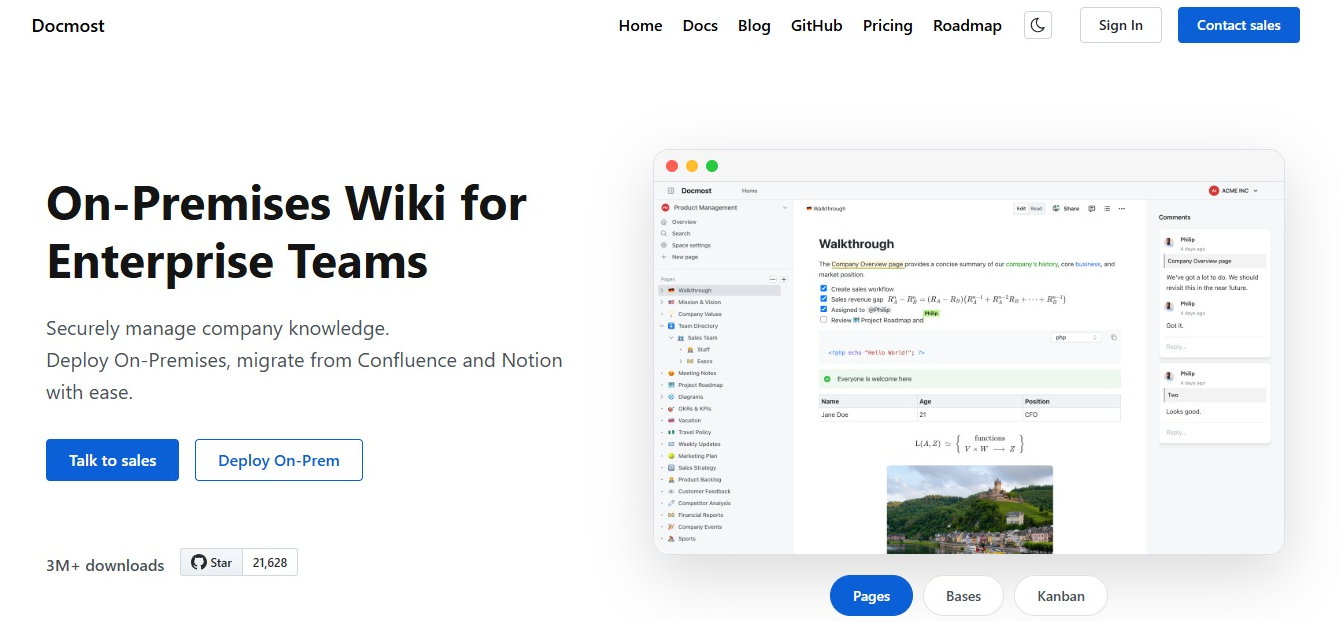
And it comes with:
- Real-time editing, so your team can work on the same page together
- Spaces to organize pages by team, project, or department
- Permissions at the workspace and space level, with groups for handing out access in bulk
- Bases on Enterprise, which turn your content into structured databases with table and kanban views
There's more in the Docmost documentation.
See how Docmost compares to Confluence, or try it for yourself.