7 Best Open Source Knowledge Base Software

Organizations today are placing greater emphasis on where their knowledge lives and who has access to it. Internal documentation often contains sensitive information such as engineering designs, security procedures, customer data, and operational playbooks. As a result, many teams are moving away from cloud-only solutions in favor of platforms that give them complete control over their data.
Open source knowledge base software has become a popular choice for organizations that prioritize data privacy, digital sovereignty, and regulatory compliance. By self-hosting the software, businesses can keep documentation within their own infrastructure, meet internal security requirements, and avoid relying on third-party vendors to store critical company knowledge. This approach is particularly valuable for government agencies, healthcare providers, financial institutions, and enterprises operating in regulated industries.
In this guide, we'll explore the best open source knowledge base software that you can self-host on your own infrastructure, giving you full control over your data while meeting regulatory, security, and data sovereignty requirements.
1. Docmost
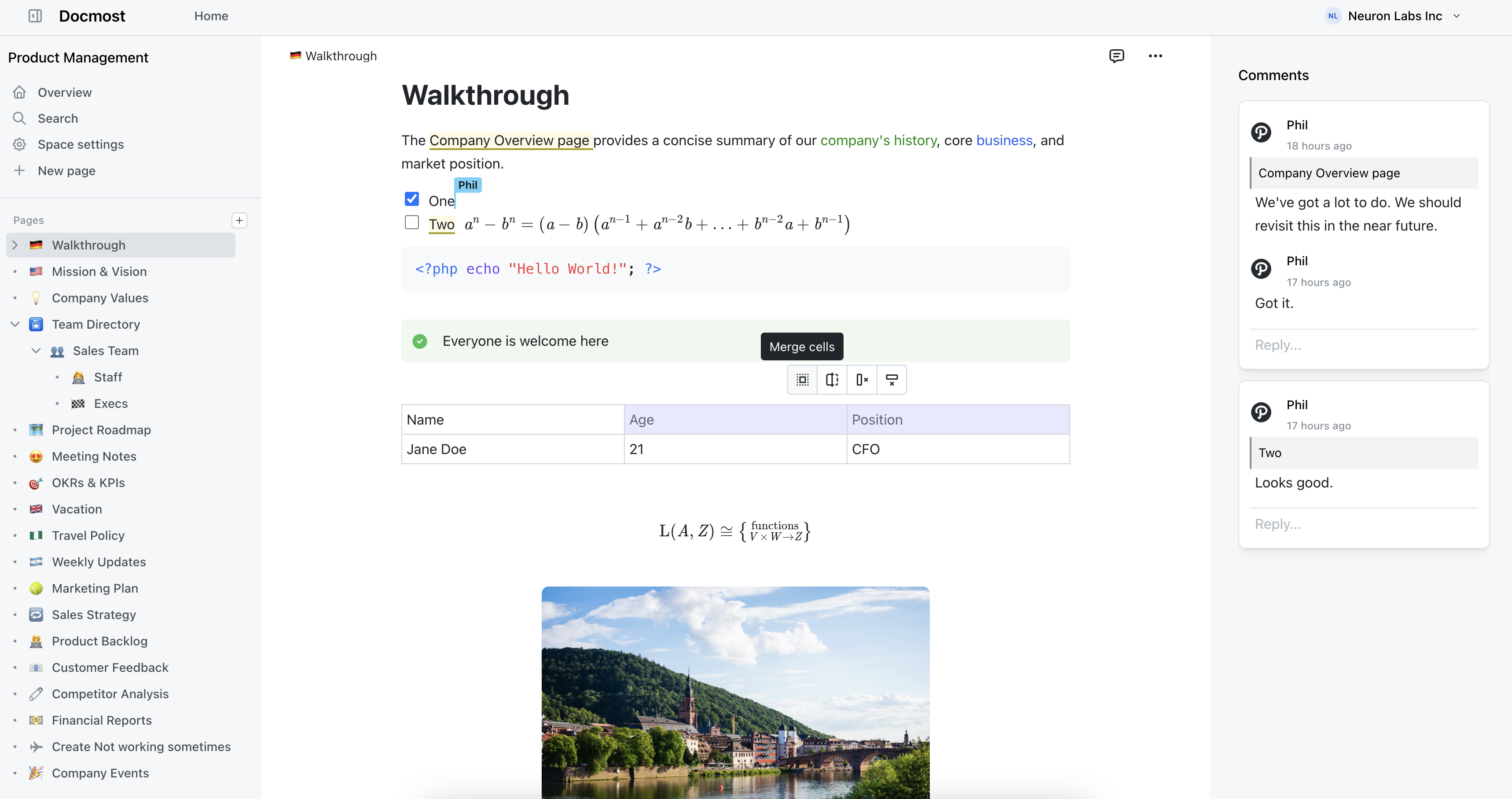
Docmost is an enterprise-grade open source collaborative wiki and documentation platform that combines modern documentation with spreadsheet-like databases called Bases.
The editor is where that shows. It's a block-based rich text editor with real-time collaboration built in, so several people can work on the same page at once and see each other's cursors and edits as they happen. You get inline comments, @mentions, page history, and the formatting you'd expect from a modern document editor. There's no markup syntax to learn, although Markdown shortcuts are available if you prefer them.
Beyond traditional documentation, Bases let you create spreadsheet-like databases for tracking structured information such as projects, assets, customers, or internal processes. Each Base supports multiple views, including a Kanban view that makes it easy to manage tasks and workflows visually. This allows teams to combine documentation, data, and lightweight project management in a single platform.
Pages are grouped into spaces, with nested hierarchies inside each one, making it easy for both small teams and large enterprises to keep information organized. Permissions can be managed at both the space and page level, with support for groups to simplify access control.
Docmost also includes built-in support for Draw.io, Excalidraw, and Mermaid diagrams, full-text search across pages and supported file attachments, and enterprise features such as LDAP, SAML/OIDC single sign-on, SCIM provisioning, and page verification workflows for organizations with advanced security and governance requirements.
Docmost features
- Collaborative Real-time Editor: Work together on pages in real time.
- Bases: Create powerful spreadsheet-like databases to organize and manage structured information.
- Kanban: Create Kanban boards to track tasks, workflows, and lightweight projects.
- Diagrams: Built-in support for Drawio, Excalidraw, and Mermaid diagramming tools.
- Spaces: Organize your pages by team, projects, or departments for better collaboration.
- AI: Ask questions across your knowledge base, translate pages, generate summaries, or connect to other systems via MCP.
- Permissions Management: Easily control access to pages with easy-to-understand permissions.
- Groups: Easily grant unified permissions to users via groups.
- Comments: Add inline comments to pages for better communication and feedback.
- Page History: Track changes with a comprehensive version history.
- Page verification workflow: Keep documentation accurate with a page verification workflow that lets teams assign reviewers, verify content, and receive reminders when pages are due for revalidation.
- Nested Navigation: You can nest and reorder pages via the sidebar.
- Search: Quickly find the information you need with powerful search capabilities.
- File Attachment: Attach files to your pages for quick reference and sharing.
- Attachments search: Full-text search and indexing of content in PDF and DOCX file attachments.
- Embeds: Embed content from Airtable, Loom, YouTube, and more.
- Authentication: Email and password, LDAP and SSO login (SAML/OIDC) in the Enterprise edition.
- SCIM: Automate user provisioning and deprovisioning with SCIM to keep users and groups synchronized with your identity provider.
2. BookStack
BookStack takes the opposite approach to a blank canvas. Instead of letting you structure content however you like, it hands you a fixed model and asks you to work inside it.
Pages live in chapters, chapters live in books, and books sit on shelves. That's the entire structure. You don't spend the first week debating how to organize things, because the decision is already made for you. For teams whose past wikis turned into a flat pile of documents nobody could navigate, that constraint is a relief rather than a limit.
The editor is a clean WYSIWYG with a Markdown option. Search works well even across thousands of pages. Authentication covers SAML, LDAP, Okta, Google, and the usual providers. It runs on PHP and MySQL, so hosting requirements are modest and you can have it installed on a cheap VM in about ten minutes.
The honest trade-off is collaboration. BookStack uses a draft-and-save model with edit notifications, not live multi-cursor editing. If your content is mostly long-form pages owned by one person at a time, that's fine. If your team writes together during meetings, you'll notice the gap.
3. AFFiNE
AFFiNE is what you get when someone tries to merge a docs tool, a whiteboard, and a database into one application and mostly pulls it off. For teams whose knowledge doesn't fit neatly into pages, it covers more ground than anything else here.
The headline feature is that any page can be viewed two ways: as a normal document or as an infinite canvas. Same content, two presentations. If your team writes things down and then constantly ends up in a separate whiteboard tool to think visually, AFFiNE keeps both in the same place. On top of that you get block-based editing, embedded databases, and kanban and table views for structured content.
It's built local-first, so the app works fully offline and syncs when you reconnect, either through AFFiNE's own cloud or a server you host yourself. Desktop apps are available across the major platforms.
The trade-off is maturity. AFFiNE moves fast, which is good for new features and less good for stability. If you need a tool that hasn't changed in three years and never surprises you, look elsewhere. If you don't mind the occasional rough edge in exchange for a genuinely different way of organizing knowledge, it pays off.
4. XWiki
XWiki is the heavyweight of this list. It's a mature, Java-based platform that has been around for close to two decades and is built for organizations that need their wiki to do real work beyond storing pages.
What sets it apart is structured content. You can build small applications inside the wiki, define custom data types, and turn pages into forms, dashboards, and databases without writing a full app. Large companies use it to run internal portals, not just documentation. It supports LDAP, SSO, and fine-grained permissions, and its extension marketplace is deep.
All of that power comes with weight. XWiki asks more from your servers and your administrators than a lightweight tool does, and the interface reflects its age in places. But if you need a knowledge base that can grow into a structured internal platform, few open source tools match its ceiling.
5. DokuWiki
DokuWiki is proof that a knowledge base doesn't need a database to be useful. It stores everything in plain text files, which makes backups as simple as copying a folder and makes the whole system remarkably durable.
That design keeps it light. DokuWiki runs comfortably on modest hardware, installs in minutes, and rarely breaks. Its plugin ecosystem is large and long-lived, so you can add access control, editors, and integrations as you need them. Versioning and page history come built in.
It shows its age in the writing experience. The default editor uses wiki syntax rather than a rich WYSIWYG, though plugins improve that. For a technical team or a small group that values reliability and easy backups over a modern editor, DokuWiki keeps doing its job year after year with almost no maintenance.
6. MediaWiki
MediaWiki is the software that runs Wikipedia, which tells you what it's built for. It scales to enormous numbers of pages and readers, and it has been hardened by some of the highest-traffic wikis in existence.
If you're building a large reference wiki, an internal encyclopedia, or a public knowledge site with many contributors, nothing else here has been tested at that scale. There's a huge library of extensions, and the community and documentation behind it dwarf anything else on this list.
The catch is that MediaWiki is a lot of tool for a small team. It uses wikitext markup, which has a real learning curve for non-technical contributors, and its default interface feels dated next to newer options. Setting it up and maintaining it assumes some comfort with servers. For a ten-person team that wants to jot down processes, it's overkill. For a growing reference wiki that many people edit, it's the proven choice.
7. Wiki.js
Wiki.js is the option for people who care about how their wiki looks and behaves down to the detail. It's a Node.js-based platform with a polished interface and a lot of configuration under the hood.
You can write in Markdown, a visual editor, or plain HTML, and switch depending on the page. Content can be stored in a database and optionally mirrored to a Git repository, which appeals to teams that want their documentation version-controlled the same way code is. Authentication is broad, covering local accounts, LDAP, SAML, OAuth, and dozens of providers.
The cost of that flexibility is setup effort. Wiki.js gives you a lot of knobs, and getting it tuned to your liking takes longer than a tool like BookStack. It runs on PostgreSQL or another supported database and expects you to be comfortable with a bit of configuration. It's also worth knowing that development has slowed, with major releases arriving less often than they once did, so check the project's recent activity before you commit to it. Teams that enjoy that control still get a very capable system. Teams that just want something running by lunch might find it heavier than they need.