Best 5 Open-Source Quip Alternatives After the Salesforce Shutdown

In March 2026, Salesforce confirmed what most Quip customers had been bracing for: Quip is being retired.
The official timeline gives existing customers about a year to plan. New paid, free, and trial accounts stopped being available to non-customers on February 17, 2026. Subscriptions cannot be renewed after March 1, 2027. Your Quip instance keeps working until March 31, 2027, then enters a 90-day read-only window, followed by 90 days of blocked logins, followed by a roughly 30-day data deletion process. By mid-2027, the data is gone.
Salesforce's recommended migration is into Slack canvases, Agentforce, and the rest of the Salesforce portfolio. That makes sense if you already live inside that stack. It makes much less sense if you originally chose Quip because you wanted a focused collaborative documents tool and weren't planning to commit to a CRM ecosystem.
If you're in that second group, the timing is actually decent. The open source space for collaborative docs has matured a lot since Quip launched in 2012. There are real alternatives now. Not toys. Tools you can run for a five-person team or a five-thousand-person company.
These are five worth looking at.
1. Docmost
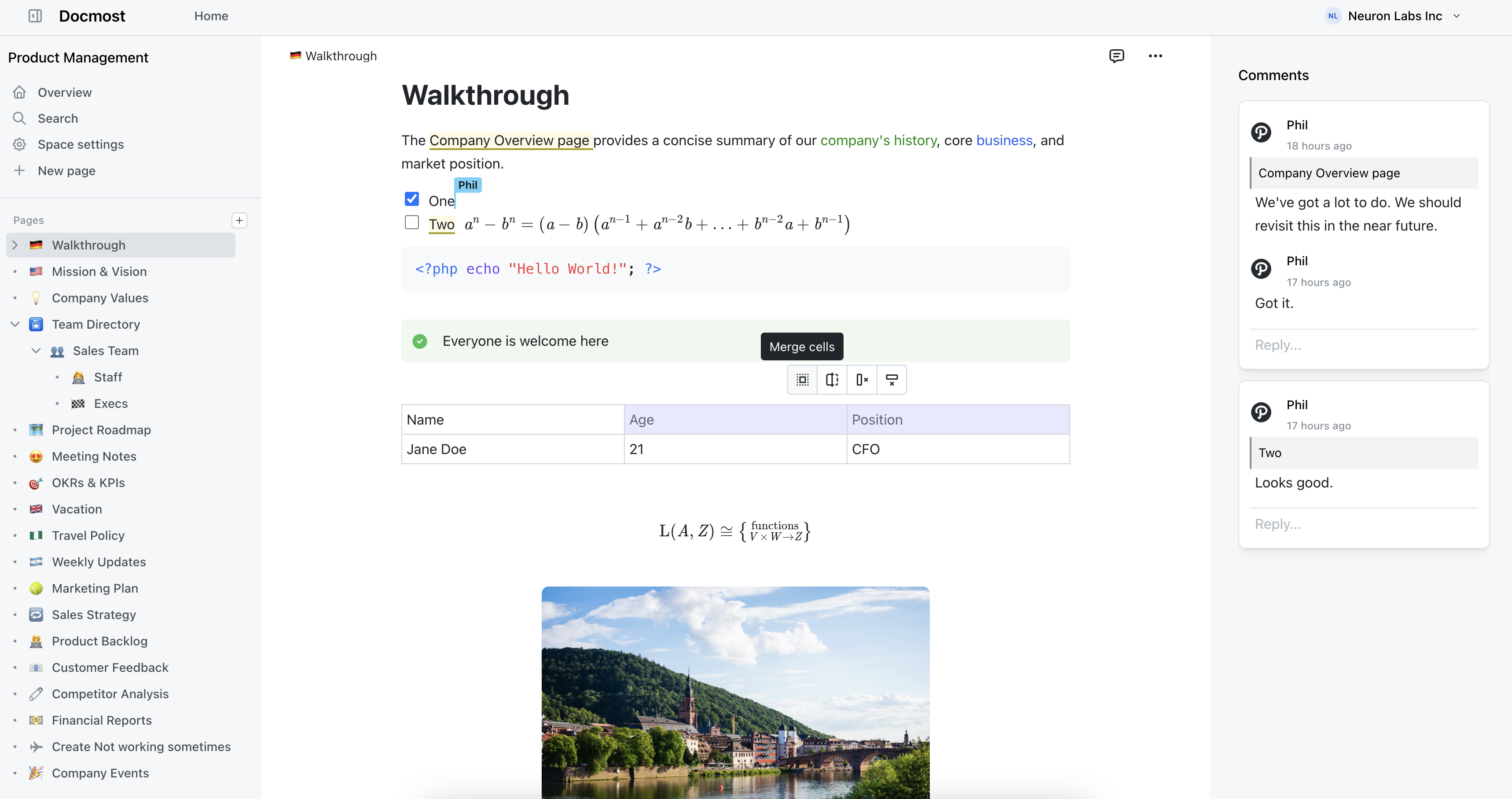
Docmost is an open source collaborative wiki software for enterprise teams. If you used Quip for team docs, meeting notes, project pages, and shared knowledge, Docmost is the closest direct replacement on this list.
The editor is the first thing that feels familiar. It's a block-based rich text editor with real-time collaboration built in. Multiple people can edit the same page at the same time and see each other's cursors and changes. You get inline comments, @mentions, page history, and the kind of formatting tools you'd expect from a modern document app. No markup syntax to learn, though Markdown shortcuts are there if you want them.
Where Docmost goes further than Quip is in organization. Content is grouped into spaces, with nested page hierarchies inside each one. You can scale from a single team workspace to an org with dozens of departments without the structure falling apart. Permissions are managed at the space and group level, so you're not reconfiguring access page by page every time someone joins or leaves a project.
The Bases feature in Docmost can cover many of the structured workflows teams may have previously managed in Quip spreadsheets. Bases let you organize information in table and Kanban views, with properties, filters, sorting, and formulas. That makes them useful for project trackers, content calendars, task lists, documentation reviews, lightweight inventories, and other workflows where you need more structure than a regular page but don't want to switch to a separate spreadsheet or project management tool.
It also covers things Quip never shipped cleanly: built-in diagramming through Draw.io, Excalidraw, and Mermaid; full-text search across the entire workspace; SSO, LDAP, and SAML for enterprise authentication; and file attachments handled like a proper storage layer rather than an afterthought.
Docmost features
- Collaborative Real-time Editor: Work together on pages in real time.
- Diagrams: Built-in support for Drawio, Excalidraw, and Mermaid diagramming tools.
- Spaces: Organize your pages by team, projects, or departments for better collaboration.
- AI: Ask questions across your knowledge base, translate pages, generate summaries, or connect to other systems via MCP.
- Bases: Create powerful spreadsheet-like databases to organize and manage structured information.
- Kanban: Create Kanban boards to track tasks, workflows, and lightweight projects.
- Permissions Management: Easily control access to pages with easy-to-understand permissions.
- Groups: Easily grant unified permissions to users via groups.
- Comments: Add inline comments to pages for better communication and feedback.
- Page History: Track changes with a comprehensive version history.
- Nested Navigation: You can nest and reorder pages via the sidebar.
- Search: Quickly find the information you need with powerful search capabilities.
- File Attachment: Attach files to your pages for quick reference and sharing.
- Attachments search: Full-text search and indexing of content in PDF and DOCX file attachments.
- Embeds: Embed content from Airtable, Loom, YouTube, and more.
- Authentication: Email and password, LDAP and SSO login (SAML/OIDC) in the Enterprise edition.
2. AppFlowy
AppFlowy is closer to Notion than to Quip, but the overlap with how a lot of Quip teams worked is real. It combines documents, databases, and kanban boards in a single workspace, built around a block-based editor that handles drag-and-drop, embedded content, and structured data inside the same surface.
It works offline by default and syncs when you reconnect, which is unusual for tools in this category and useful if your team travels or works in patchy network conditions. Native desktop apps are available for macOS, Windows, and Linux, with mobile coverage as well. The project is younger than some of the others on this list, so the feature set is still expanding, but the foundation is solid.
The trade-off is that AppFlowy is general-purpose rather than docs-specific. If you need deep document hierarchies and granular space-level permissions, you'll feel the gap. If you want a flexible workspace that bends to match how your team thinks, you won't.
Best for: Teams that liked Quip's mix of documents and structured data and want a Notion-style replacement they can self-host.
3. BookStack
BookStack takes a different angle from the other tools on this list. Instead of mimicking what Quip felt like to use day-to-day, it gives you a fixed, opinionated structure for organizing content that lasts.
Pages live inside chapters, chapters live inside books, and books live on shelves. That's the whole model. You don't spend the first week deciding how to structure things, because the structure is already decided. For teams whose Quip workspaces became a flat soup of documents that nobody could find, this constraint is actually a relief.
The editor is a clean WYSIWYG with a Markdown option for those who prefer it. Search works well across the entire instance, even with thousands of pages. The permission model is straightforward without being shallow, and it covers what most teams need without a half-day admin session.
Authentication includes SAML, LDAP, Okta, Google, GitHub, and the usual suspects. It runs on PHP and MySQL, which means the hosting requirements are modest and you can install it on basically any cheap VM in about ten minutes.
The honest trade-off is real-time collaboration. BookStack uses a draft-and-save model with edit notifications, not the live multi-cursor experience Quip popularized. If your Quip usage was mostly long-form documents that one person owned at a time, with comments and reviews from others, BookStack handles that pattern well. If it was active co-writing during meetings, you'll want one of the other options.
Best for: Teams that want a structured, low-maintenance knowledge base and don't need live co-editing as their primary mode.
4. AFFiNE
AFFiNE is what happens when someone tries to merge a docs tool, a whiteboard, and a database into one application and mostly pulls it off.
The headline feature is that any page can be viewed either as a document or as an infinite canvas. The same content, two presentations. If your team used Quip for written discussion and then constantly ended up in Miro or Figma for visual thinking, AFFiNE keeps both modes in the same place.
You also get block-based editing, embedded databases, kanban and table views, and a strong local-first design. AFFiNE syncs through its own cloud or a self-hosted server, and the desktop apps work fully offline.
The project moves fast, which is good for new features and less good for stability. Teams that need a tool that hasn't changed in three years should look elsewhere. Teams that don't mind watching a young project mature, and tolerate the occasional rough edge, will get a lot of value out of it.
Best for: Teams that do both written and visual thinking and want them in the same workspace rather than switching between two tools.
5. HedgeDoc
HedgeDoc is the simplest tool on this list. It's a real-time collaborative Markdown editor. That's it. No spaces, no databases, no embedded apps.
If that sounds limited, it is. But it's also the right answer for a specific kind of team: technical groups that want to write Markdown together, see each other's cursors, and not deal with a complicated permission system or a heavy backend. Engineers, researchers, and writers who already think in Markdown often end up preferring it for that reason.
HedgeDoc supports presentation mode through reveal.js, code syntax highlighting, MathJax equations, diagrams via Mermaid, and exports to PDF and slides. Authentication covers LDAP, OAuth, SAML, and a handful of social logins.
The instance can be installed on basically anything, and runs comfortably on a small VM. Maintenance is low. The community is active.
It won't replace Quip for everyone. But for a team that used Quip as a glorified shared notebook, HedgeDoc covers that pattern with a fraction of the surface area.
Best for: Technical teams that want lightweight, real-time Markdown collaboration without the overhead of a full knowledge base platform.
Which one replaces Quip?
The right choice depends on what you actually used Quip for.
If most of your usage was team docs and shared knowledge, Docmost is the closest replacement and the one with the lowest switching cost. The editor, the collaboration model, and the permissions all map cleanly to how Quip teams already work.