Top 7 Dropbox Paper Alternatives

Dropbox Paper offers a simple way for teams to create documents, share ideas, assign tasks, and collaborate in real time.
For teams already using Dropbox, Paper can be particularly convenient. Documents live alongside other Dropbox files, while features such as comments, mentions, tables, timelines, and to-dos make it useful for meeting notes, project plans, brainstorms, and lightweight documentation. Dropbox currently allows up to 50 people to edit a Paper document at the same time.
However, teams that rely heavily on Paper may eventually need more than collaborative documents.
You may want a structured company wiki, stronger permissions, better search, databases, AI-powered knowledge discovery, enterprise authentication, or more control over where your organization's data is hosted.
If that sounds familiar, there are several Dropbox Paper alternatives worth considering.
Why look for a Dropbox Paper alternative?
Dropbox Paper is still useful for collaborative writing.
It lets teams create documents that combine text, media, files, tables, and tasks. Team members can leave comments, @mention colleagues, assign to-dos, and add due dates. Newer Paper documents are also stored directly in Dropbox alongside other files and folders, making them easier to organize within an existing Dropbox workspace.
The limitations become more noticeable when Paper starts serving as the central repository for an organization's knowledge.
Growing teams may need:
- Dedicated spaces for departments and projects
- Nested pages and clearer navigation
- Granular permissions
- More advanced search
- Search inside uploaded documents
- Databases and Kanban boards
- AI-powered knowledge retrieval
- SSO and automated user provisioning
- Audit logs
- Document review and verification workflows
- APIs and automation
- Self-hosting or on-premises deployment
For those use cases, a purpose-built knowledge management or documentation platform may be a better fit.
Best Dropbox Paper alternatives at a glance
| Tool | Best for | Deployment |
|---|---|---|
| Docmost | Self-hosted collaborative documentation and company wikis | Self-hosted / on-premises |
| Notion | Flexible docs, databases, projects, and AI | Cloud |
| Confluence | Organizations using Jira and Atlassian Cloud | Cloud for new customers |
| Slite | AI-focused knowledge management | Cloud |
| Nuclino | Lightweight team knowledge bases | Cloud |
| Google Docs | Straightforward collaborative writing | Cloud |
| Microsoft 365 | Organizations centered on Microsoft tools | Primarily cloud |
1. Docmost
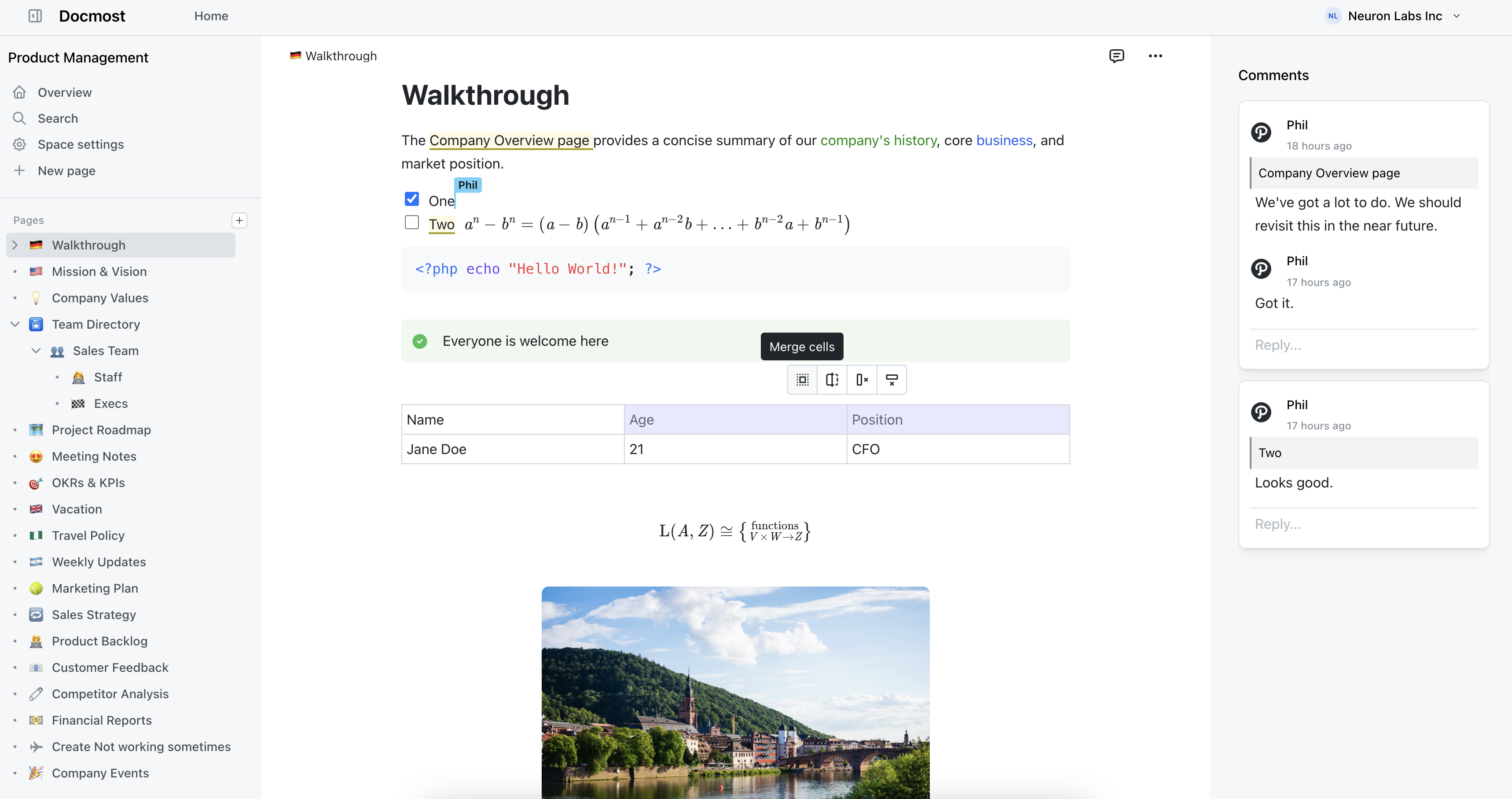
Docmost is a self-hosted enterprise-ready collaborative wiki and documentation platform.
Like Dropbox Paper, it allows multiple people to edit the same page simultaneously without overwriting each other's work. But Docmost is designed around building and maintaining a structured organizational knowledge base rather than primarily creating standalone collaborative documents.
Organize knowledge with Spaces and nested pages
Docmost organizes content into Spaces.
A Space can represent an engineering team, HR department, product, project, customer documentation portal, or another part of an organization.
Each Space can have its own permissions, while pages can be nested, reordered, and moved using drag-and-drop navigation.
This gives teams a clearer information hierarchy as their documentation grows. Rather than collecting hundreds of individual documents, teams can create structured areas for policies, onboarding, technical documentation, product knowledge, meeting notes, and internal processes.
Real-time collaboration
Docmost includes the collaboration features teams would expect from a modern documentation platform.
These include:
- Real-time collaborative editing
- Comments
- Resolvable comment threads
- @mentions
- Page history and restoration
- Groups
- Templates
- Labels
- Synced blocks
- Public page sharing
- File attachments
Its editor also supports rich tables, callouts, toggle blocks, mathematical equations, Markdown shortcuts, and keyboard shortcuts.
For technical teams, built-in diagram support includes Draw.io, Excalidraw, and Mermaid, allowing diagrams to live directly alongside the documentation they explain.
Bases and Kanban boards
For teams that need more structure than ordinary documents provide, Docmost includes Bases.
Bases let teams organize information in database-style table and Kanban views using properties, filters, sorting, and formulas.
This can be useful for:
- Documentation review queues
- Project tracking
- Editorial calendars
- Product inventories
- Research collections
- Team directories
- Knowledge management workflows
It makes Docmost suitable not only for writing documentation but also for organizing structured information around that documentation.
Search and AI
Docmost provides full-text search across pages with filters for spaces and content types. Paid editions can additionally search inside PDF and DOCX attachments.
AI features include AI-powered search, writing assistance, translation, content generation, and chat.
Teams can use cloud AI models or connect Docmost to local language models, which can be useful for organizations that want tighter control over how internal knowledge is processed.
Docmost also supports MCP, allowing compatible AI tools and agents to interact with workspace knowledge.
Self-hosting and data control
Self-hosting is one of the biggest differences between Docmost and Dropbox Paper.
Docmost can be deployed entirely on infrastructure controlled by your organization. It can also operate in air-gapped environments without external dependencies.
This gives organizations greater control over:
- Data location
- Infrastructure
- Security policies
- Backups
- Network access
- Deployment configuration
- Compliance requirements
Docmost also offers enterprise capabilities such as SAML, OIDC and LDAP authentication, MFA, SCIM provisioning, granular page permissions, audit logs, security controls, API access, attachment indexing, and page verification and approval workflows.
For teams moving from another documentation system, Docmost supports imports from Markdown, HTML, Notion, Confluence, DOCX, and PDF depending on the edition.
2. Notion
Notion is one of the most popular alternatives to Dropbox Paper for teams that want a broader workspace.
It combines documents, wikis, databases, project management, and AI functionality within the same platform.
Instead of treating every piece of information as a traditional document, Notion uses flexible blocks. Pages can contain text, images, checklists, databases, embeds, tables, and many other content types.
Its database capabilities are particularly useful.
Teams can create:
- Product roadmaps
- Editorial calendars
- Project trackers
- Content libraries
- Employee directories
- CRM-style systems
- Knowledge repositories
Notion also supports teamspaces, page verification, SAML SSO, private teamspaces, granular database permissions, enterprise search, AI Meeting Notes, and AI agents.
The main advantage over Dropbox Paper is flexibility. A company can use Notion for far more than collaborative documents.
That flexibility can also become a drawback. Without clear workspace rules, templates, and ownership, Notion installations can grow complicated quickly.
3. Confluence
Confluence is one of the most established platforms for internal documentation and company knowledge management.
It organizes content into spaces and pages and is commonly used for engineering documentation, project requirements, internal policies, meeting notes, and product knowledge.
Its biggest advantage is integration with the wider Atlassian ecosystem.
For companies already using Jira extensively, Confluence can provide a natural place to maintain documentation connected to development projects, tickets, product requirements, and operational workflows.
However, there is now an important deployment consideration for organizations comparing Confluence with Dropbox Paper alternatives.
Atlassian stopped selling new Data Center subscriptions to new customers on March 30, 2026. Existing customers have a transition period, but affected Data Center products are scheduled to reach end of life on March 28, 2029.
This means organizations evaluating Confluence today should generally view it as a cloud-first platform rather than a new self-hosted option.
That distinction matters for companies with strict on-premises, air-gapped, or infrastructure-control requirements.
4. Slite
Slite focuses specifically on organizational knowledge rather than general file storage.
It combines a collaborative editor with tools designed to keep knowledge accurate and easy to retrieve.
Teams can collaborate through:
- Real-time editing
- Comments
- Mentions
- Notifications
- Templates
- Document history
- File uploads
Where Slite differentiates itself is knowledge maintenance.
It includes document ownership, verification workflows, knowledge insights, and AI-powered search. Its AI capabilities can also search connected tools, fact-check documents, suggest corrections, and run knowledge workflows.
For larger organizations, Slite provides features such as SSO, SCIM provisioning, granular permissions, audit logs, and additional security controls.
Compared with Dropbox Paper, Slite is much more deliberately designed around creating a trusted organizational knowledge base.
The main difference from Docmost is deployment: Slite is a cloud service, while Docmost can be self-hosted.
5. Nuclino
Nuclino is a lightweight knowledge management and collaboration platform.
Like Dropbox Paper, it emphasizes simplicity and fast adoption.
Teams can collaboratively write documents while organizing information into a more structured workspace. Nuclino also offers several ways to visualize information, making it useful for documentation, lightweight projects, and knowledge management.
For administration and security, Nuclino supports capabilities including SAML SSO, two-factor authentication, groups, access rights, audit logs, team insights, APIs, and controls around capabilities such as public sharing and exports.
Its relative simplicity can be a significant advantage.
Products such as Notion and Confluence can become highly configurable environments with numerous ways to organize information. Nuclino aims for a more straightforward experience.
For a small team that likes the lightweight nature of Dropbox Paper but needs better knowledge organization, that can make Nuclino appealing.
6. Google Docs
If what your team likes most about Dropbox Paper is simply writing together, Google Docs is one of the most obvious alternatives.
Google Docs provides a mature real-time editing experience where multiple contributors can:
- Edit simultaneously
- Leave comments
- Suggest changes
- Mention coworkers
- Review version history
- Share documents internally or externally
It also integrates tightly with Google Drive, Gmail, Meet, Calendar, Sheets, and Slides.
For drafting reports, proposals, meeting notes, articles, and other conventional documents, Google Docs is difficult to beat for familiarity.
The main limitation appears when a company tries to use Google Drive as a full organizational knowledge base.
Documents are primarily organized through Drive files and folders. As content grows, teams can end up with complicated folder structures, duplicated documents, unclear ownership, and difficulties deciding which document contains the current answer.
A dedicated wiki platform provides more intentional hierarchy and navigation.
7. Microsoft 365
Microsoft 365 is another strong Dropbox Paper alternative for organizations already standardized on Microsoft's productivity ecosystem.
Microsoft Word provides collaborative editing, comments, version history, and extensive document formatting.
OneDrive and SharePoint provide storage and sharing, while Teams gives employees a communication and collaboration layer around those documents.
Its biggest advantage is familiarity.
Organizations already using:
- Word
- Excel
- PowerPoint
- Outlook
- Teams
- OneDrive
- SharePoint
may not need to introduce another collaboration product at all.
However, documentation can easily become fragmented.
Knowledge may be spread between Word documents, Teams channels, SharePoint sites, OneDrive folders, and email conversations.
That can make Microsoft 365 less straightforward than a purpose-built wiki when the objective is to establish one searchable source of truth for internal knowledge.
What to look for in a Dropbox Paper alternative
The right replacement depends on what your team wants to improve.
1. Real-time collaboration
If several employees regularly work on the same documents, real-time editing should be a baseline requirement.
Also look for:
- Comments
- Mentions
- Notifications
- Version history
- Page restoration
These features make both synchronous and asynchronous collaboration easier.
2. Knowledge organization
Think beyond the first few dozen documents.
As your knowledge base grows, teams need a predictable way to navigate it.
Look for features such as:
- Spaces
- Nested pages
- Labels
- Collections
- Databases
- Templates
A good hierarchy reduces the amount of time employees spend searching for information.
3. Search
Documentation only creates value if employees can find it later.
Full-text search should cover page content, not just titles.
If your organization works with many uploaded Word files and PDFs, attachment indexing can also be valuable.
AI-powered search is increasingly useful for larger knowledge bases because employees can ask questions instead of manually searching through numerous pages.
4. Permissions and security
Small teams may only need basic sharing controls.
Larger organizations often need much more, including:
- Granular page permissions
- SSO
- MFA
- SCIM
- Audit logs
- Security policies
- Groups
- Document review workflows
These capabilities become particularly important when documentation contains sensitive company information.
5. Deployment model
Many Dropbox Paper alternatives are SaaS-only.
That can be perfectly suitable for many teams.
But organizations with strict data residency, regulatory, security, or network-isolation requirements may need a self-hosted option.
Platforms such as Docmost provide a different model by allowing organizations to run the software on their own infrastructure.
6. Import and export capabilities
Migration matters.
Check whether the platform can import content from the system you already use and whether you can export your information later.
Good portability makes it easier to avoid being permanently locked into one knowledge management platform.
Which Dropbox Paper alternative is best?
There is no single best Dropbox Paper alternative for every team.
However, Docmost combines real-time collaborative editing with Spaces, nested pages, comments, version history, templates, diagrams, full-text search, structured Bases, granular permissions, AI capabilities, API access, MCP, enterprise authentication, and migration tools. It can also be deployed entirely on your own infrastructure, including in air-gapped environments.
For teams that appreciate the collaborative simplicity of Dropbox Paper but need a more structured and controllable knowledge platform as they grow, Docmost is a strong alternative.