Best 7 Document Collaboration Software

Document collaboration has moved far beyond emailing Word files back and forth or trying to figure out which attachment contains the latest version.
Today, teams need a shared workspace where multiple people can write, review, comment, organize information, and find the right document without creating yet another information silo.
The best document collaboration software combines a strong editor with real-time collaboration, permissions, search, version history, and knowledge management. For organizations with stricter security requirements, deployment options, authentication, auditability, and control over company data are equally important.
Below, we compare some of the best document collaboration software available today and explain which teams each option is best suited for.
What is document collaboration software?
Document collaboration software allows multiple people to create, edit, review, and share documents from a common workspace.
Unlike traditional word processors, modern collaboration platforms generally provide much more than document editing. They may include:
- Real-time collaborative editing
- Comments and mentions
- Version history
- Search
- Team workspaces
- Permissions and access controls
- Templates
- Databases and project views
- AI-assisted writing and search
- Document publishing
- Integrations and APIs
The right choice depends on whether your team primarily needs a collaborative word processor, an internal knowledge base, a company wiki, or a broader workspace for managing both documentation and structured information.
Best document collaboration software at a glance
| Software | Best for | Deployment |
|---|---|---|
| Docmost | Self-hosted documentation and knowledge collaboration | Self-hosted / on-premises |
| Google Docs | Fast, familiar document collaboration | Cloud |
| Notion | Flexible docs, databases, and project workflows | Cloud |
| Confluence | Large teams already using Atlassian products | Cloud |
| Microsoft 365 | Organizations working primarily with Microsoft Office | Cloud |
| Slite | AI-focused team knowledge bases | Cloud |
| Nuclino | Lightweight collaborative documentation | Cloud |
1. Docmost
Best for: Teams that want collaborative documentation with full control over their infrastructure and data.
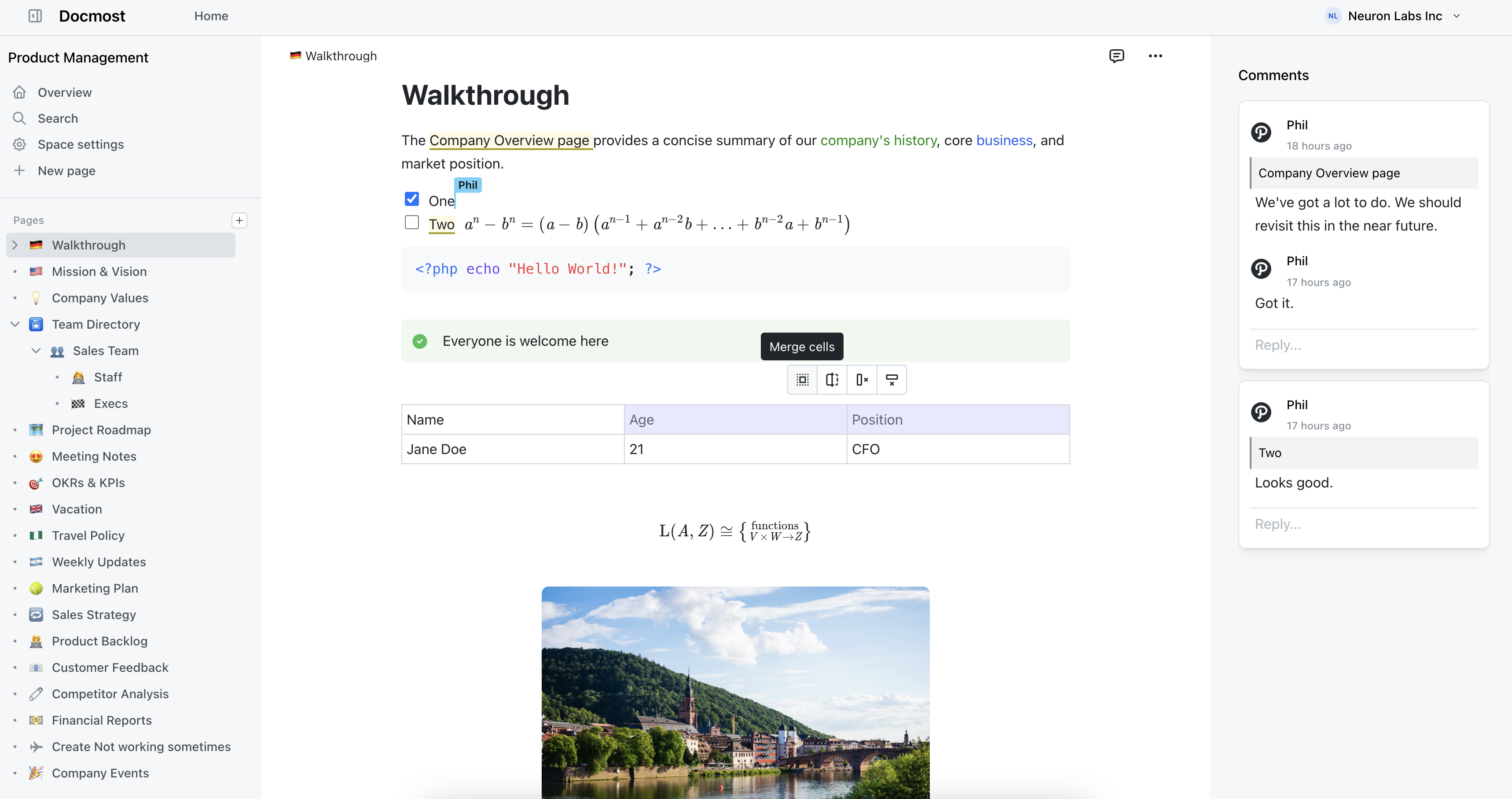
Docmost is an open-source, enterprise-ready collaborative wiki and documentation platform designed for teams that want a modern editing experience without giving up control over where their information is stored.
Multiple team members can edit the same page simultaneously, making Docmost suitable for internal documentation, engineering knowledge bases, policies, product documentation, meeting notes, onboarding guides, and company wikis.
Content is organized into Spaces, which can represent teams, departments, projects, or other areas of a company. Pages can be nested and reordered within those spaces, helping teams create a predictable information hierarchy rather than accumulating disconnected documents.
Docmost includes collaboration features such as comments, @mentions, page history with restoration, groups, public page sharing, and permissions. Its editor supports rich tables, callouts, toggle blocks, math equations, synced blocks, labels, Markdown shortcuts, file attachments, and built-in diagrams using Draw.io, Excalidraw, and Mermaid.
Teams that need to manage structured information can also use Bases, including table and Kanban views with properties, filters, sorting, and formulas.
Search goes beyond page titles. Docmost provides full-text page search, while paid editions can index the contents of PDF and DOCX attachments. Its AI capabilities can provide answers across your knowledge base, assist with writing and translation, and connect with other tools through MCP.
Where Docmost particularly stands apart from many cloud-first collaboration products is deployment. It can be deployed completely on your own infrastructure and can also operate in air-gapped environments. This gives organizations more control over data location, security policies, infrastructure, and upgrades.
The free Community edition includes core collaboration capabilities, while Business adds features including SSO through SAML, OIDC and LDAP, page-level granular permissions, AI and MCP, API keys, attachment indexing, MFA, Confluence migration, diagrams, and additional collaboration features. Enterprise adds capabilities including SCIM provisioning, audit logs, additional security controls, page verification/review workflows, and priority support.
Why choose Docmost?
Choose Docmost when you want the collaborative experience of a modern knowledge platform while retaining control over how and where it is deployed.
2. Google Docs
Best for: Teams that want straightforward real-time document editing.
Google Docs remains one of the most familiar collaborative editors available.
Several people can work in the same document at once, leave comments, suggest changes, mention colleagues, and share documents using Google Drive permissions. Because Docs is part of Google Workspace, it also integrates naturally with Gmail, Meet, Calendar, Sheets, and Slides.
That makes Google Docs particularly effective for proposals, reports, articles, meeting notes, and documents that move through several rounds of editing.
Google Workspace plans also bundle business email, cloud storage, meetings, administration tools, and increasingly deep Gemini AI functionality. Current Workspace plans range from Business Starter through Business Standard, Business Plus, and Enterprise.
The downside is organization at scale. Google Drive is primarily file-and-folder based, so organizations attempting to turn thousands of Docs into a structured company knowledge base can eventually find navigation and knowledge discovery difficult.
Choose Google Docs if: your priority is familiar, low-friction collaborative document editing rather than building a structured internal wiki.
3. Notion
Best for: Teams that want documents and databases in one flexible workspace.
Notion combines collaborative documents with databases, project management, publishing, AI, and automation.
Instead of treating every page as a traditional document, Notion structures content using blocks. Teams can combine text, tables, checklists, images, embeds, databases, and other content inside the same page.
Its database capabilities are one of its main strengths. Teams can create project trackers, editorial calendars, product roadmaps, content libraries, and other custom workflows alongside their documentation.
For collaboration, Notion offers teamspaces, permission groups, page history, comments, sharing, and guest access. Higher-tier plans introduce capabilities such as SAML SSO, private teamspaces, page verification, advanced permissions, AI-powered enterprise search, and additional security controls.
Notion is a strong option when teams want to customize how their workspace operates. The trade-off is that this flexibility can also lead to overly complicated workspaces unless teams establish clear templates and information architecture.
Choose Notion if: you want documents, structured databases, projects, and AI workflows inside a single cloud platform.
4. Confluence
Best for: Organizations already using Jira and the Atlassian ecosystem.
Confluence is one of the most established tools for internal documentation and company knowledge bases.
It provides pages, spaces, templates, databases, whiteboards, permissions, automation, and integrations. Its close relationship with Jira makes it particularly attractive to engineering, product, IT, and operations teams already standardized on Atlassian products.
Confluence Cloud has a free tier for up to 10 users, followed by Standard, Premium, and Enterprise options. The Standard plan currently includes features such as advanced permissions, guest access and Rovo-powered AI capabilities, while Premium adds features such as unlimited storage, expanded automation and additional administration controls.
For organizations that cannot use Atlassian Cloud, Atlassian also offers Confluence Data Center as its self-managed enterprise deployment option.
The main consideration is complexity. Large Confluence installations can require significant administration, particularly when spaces, permissions, apps, and years of legacy content accumulate.
Choose Confluence if: Jira integration and the broader Atlassian ecosystem are central to your organization.
5. Microsoft 365
Best for: Organizations centered around Word, Teams, SharePoint, and Microsoft identity.
For many companies, document collaboration already happens inside Microsoft 365.
Word supports collaborative editing, while OneDrive and SharePoint handle storage and sharing. Microsoft Teams adds meetings and communication, allowing organizations to keep documents connected to team discussions and channels.
The biggest advantage is familiarity. Employees who already work with Word, Excel, PowerPoint, Outlook, and Teams can collaborate without adopting an entirely new productivity environment.
Microsoft 365 business subscriptions bundle these tools alongside identity, cloud storage, communication, and security capabilities. For example, Business Premium currently includes the desktop, web, and mobile Office apps, Teams, OneDrive, SharePoint, business email, and additional security features.
However, documentation can become distributed across Teams, SharePoint sites, OneDrive folders, Word files, and other Microsoft services. Organizations looking specifically for a straightforward wiki experience may therefore prefer a dedicated knowledge platform.
Choose Microsoft 365 if: your company already relies heavily on Microsoft Office and wants collaboration to remain within that ecosystem.
6. Slite
Best for: Teams that want an AI-oriented knowledge base.
Slite focuses on internal documentation and organizational knowledge rather than trying to become a general-purpose office suite.
It offers a real-time collaborative editor, comments, mentions, notifications, templates, document history, AI search, and document verification. Its newer AI functionality focuses heavily on helping teams search, maintain, and verify company knowledge.
Slite currently lists its Basic plan at $10 per user per month billed yearly and Pro at $20 per user per month billed yearly, with custom Enterprise pricing.
It is particularly compelling for teams that want a polished SaaS knowledge base and prefer not to manage their own infrastructure.
Choose Slite if: AI-assisted knowledge discovery and maintenance are more important than self-hosting.
7. Nuclino
Best for: Teams that value simplicity and fast adoption.
Nuclino combines documentation, knowledge management, lightweight project management, and visual collaboration in a relatively simple interface.
Every document supports real-time collaboration, automatic saving, version history, comments, and mentions. Teams can also visualize information using list, board, table, graph, and canvas views.
Its Business tier includes Nuclino's Sidekick AI, audit logs, team insights, advanced security controls, SAML SSO, unlimited version history, and other administrative capabilities.
Nuclino intentionally emphasizes ease of use, which can be an advantage for teams that find more configurable products overwhelming.
Choose Nuclino if: you want a lightweight collaborative knowledge workspace that requires relatively little setup.
How to choose document collaboration software
Before selecting a platform, consider how your team will actually use it.
Real-time collaboration
Multiple people should be able to edit documents without overwriting one another. Comments, mentions, notifications, and version history also make asynchronous review much easier.
Organization
Good collaboration software should make information easier to find as your company grows. Look for spaces, nested pages, labels, databases, filters, or another clear organizational model.
Search
A document that cannot be found is almost as useful as a document that was never written. Evaluate full-text search and, if your organization stores lots of uploaded files, whether attachment contents are searchable.
Permissions and security
Consider who should be able to view, edit, publish, or administer information. Larger organizations may also need SSO, SCIM, MFA, audit logs, page-level permissions, or formal review workflows.
Deployment
Many collaboration platforms are SaaS-only.
That works well for many companies, but regulated, security-conscious, or infrastructure-sensitive organizations may require a self-hosted or on-premises deployment.
Data portability
Check what you can import and export. Your documentation will likely outlive several software tools, so avoiding unnecessary lock-in matters.
Which document collaboration software is best?
There is no single tool that is best for every organization.
Google Docs is difficult to beat for familiar collaborative editing. Notion is attractive for teams combining documentation with flexible databases. Confluence works particularly well for organizations deeply invested in Jira and Atlassian. Microsoft 365 makes sense when Word, Teams, and SharePoint are already company standards. Slite and Nuclino provide focused SaaS alternatives for modern knowledge management.
For teams looking for an open-source, self-hosted document collaboration and knowledge platform, Docmost provides a different approach.
You get real-time collaborative editing, Spaces, nested documentation, comments, version history, diagrams, search, permissions, structured Bases, AI capabilities, APIs, and enterprise authentication while maintaining control over your own deployment and data. Organizations can begin with the free Community edition and move to Business or Enterprise as their security, governance, and collaboration requirements grow.
If keeping your team's knowledge collaborative without giving up control of your infrastructure is important, Docmost is worth considering.