Best 7 Slab Alternatives
Slab is a knowledge base tool for internal team documentation. It has a clean editor, unified search that reaches into connected tools like Slack and Google Drive, and a free plan covering up to 10 users. At $6.67 per user per month on paid plans, it's one of the cheaper options in the category.
Slab is cloud-only with no self-hosting option, which rules it out for teams with data residency requirements. The customization options are limited compared to tools like Notion or Confluence. Users have reported frustrations with the lack of hierarchical page structure, no granular permissions, no find-and-replace, and an interface that can feel too minimal when managing a large knowledge base.
Slab does have some AI features, but they're narrow. AI Autofix catches typos as you edit. AI Predict suggests the next word as you type. AI Ask lets you query your knowledge base in natural language, but none of these cover AI writing assistance like drafting, summarizing, or translating, which most competitors now offer.
If any of these limitations matter to your team, here are seven alternatives worth considering.
1. Docmost
Docmost is an open source, self-hosted wiki and documentation platform. It gets compared to both Notion and Confluence, but without the vendor lock-in of either.
The editor is a block-based rich text editor with real-time collaboration. Multiple people can edit the same page simultaneously and see changes as they happen. If you've been using Slab's editor and found it too restrictive, Docmost gives you more formatting options: tables, callouts, toggle blocks, LaTeX for math notation, user mentions, and clipboard image pasting that just works.
Content is organized into spaces with nested pages, which gives your wiki a clear hierarchy instead of the flat list of posts that gets hard to navigate at scale. Permissions are handled at the space and group level, so access control stays manageable as your team grows.
Docmost ships with built-in diagramming through Draw.io, Excalidraw, and Mermaid. Inline comments let people leave feedback directly on content. Page history tracks every change, and AI-powered search and assistants let you ask questions across your knowledge base, generate summaries, and translate pages. MCP support connects to external tools and systems.
Authentication covers email and password out of the box, with LDAP and SSO (SAML/OIDC) available in the Enterprise edition. Licensed under AGPL-3.0.
Best for: Teams that want a modern, collaborative wiki they can self-host, with AI features.
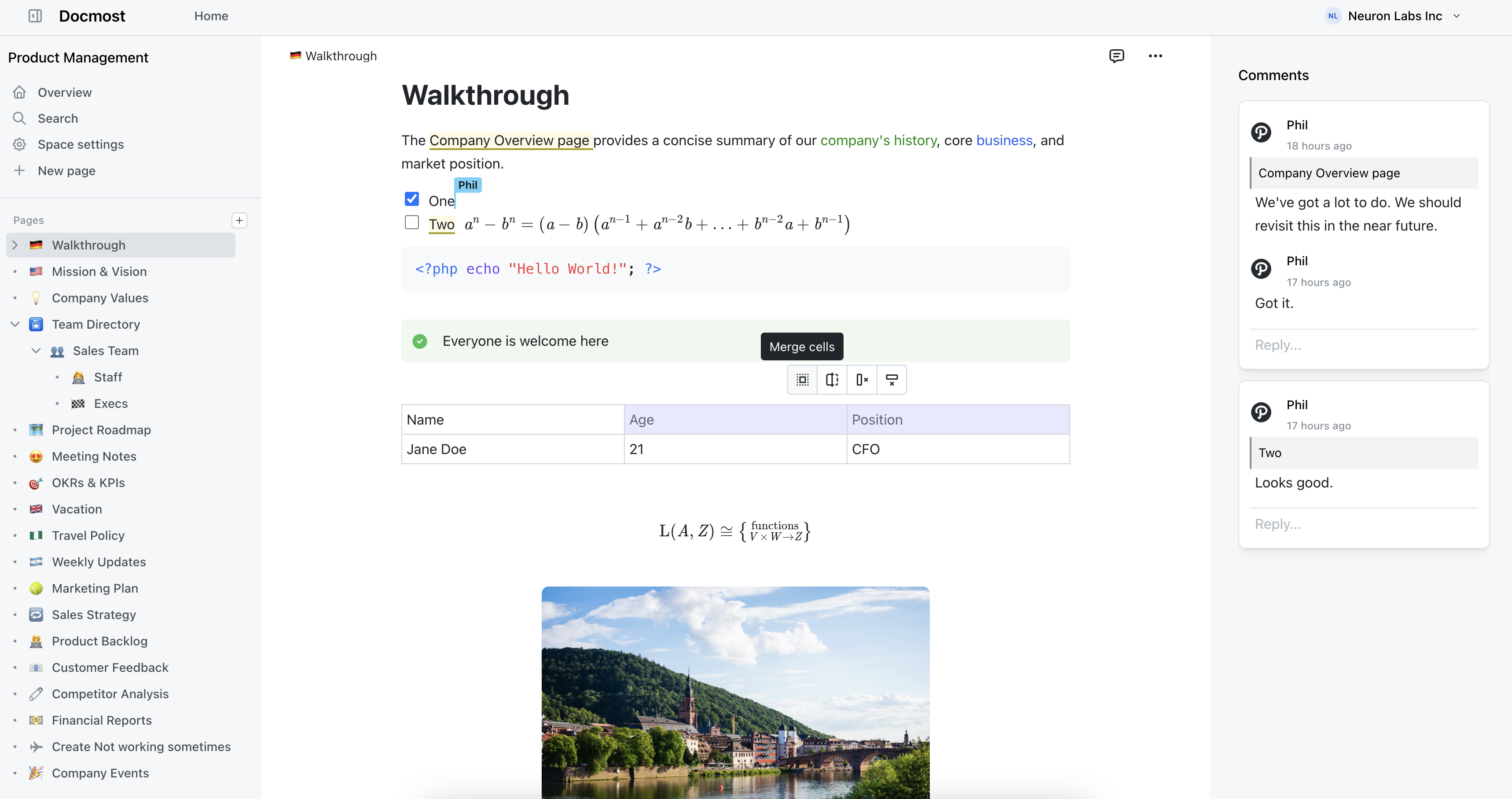
Docmost features
- Collaborative Real-time Editor: Work together on pages in real time.
- Diagrams: Built-in support for Drawio, Excalidraw, and Mermaid diagramming tools.
- Spaces: Organize your pages by team, projects, or departments for better collaboration.
- AI: Ask questions across your knowledge base, translate pages, generate summaries, or connect to other systems via MCP.
- Permissions Management: Easily control access to pages with easy-to-understand permissions.
- Groups: Easily grant unified permissions to users via groups.
- Comments: Add inline comments to pages for better communication and feedback.
- Page History: Track changes with a comprehensive version history.
- Nested Navigation: You can nest and reorder pages via the sidebar.
- Search: Quickly find the information you need with powerful search capabilities.
- File Attachment: Attach files to your pages for quick reference and sharing.
- Attachments search: Full-text search and indexing of content in PDF and DOCX file attachments.
- Embeds: Embed content from Airtable, Loom, YouTube, and more.
- Authentication: Email and password, LDAP and SSO login (SAML/OIDC) in the Enterprise edition.
2. Notion
Notion does far more than a knowledge base. Wikis, databases, project boards, meeting notes, product specs, all built on the same block-based editor. You can link databases together, create filtered views, and embed content from dozens of external services. The template library is enormous.
Where Slab is deliberately simple, Notion is deliberately flexible. That flexibility is both the selling point and the problem. Workspaces tend to grow disorganized unless someone actively maintains structure. Search still struggles in large workspaces with lots of linked databases, and performance lags when pages get heavy.
Notion's AI features are available across paid plans, but full access to agents and advanced AI requires the Business plan at $18/user/month. The Plus plan ($10/user/month) includes a limited AI trial. It's cloud-only, and the offline mode is unreliable enough that you shouldn't count on it.
Best for: Teams that want one tool for everything and don't mind the cloud-only trade-off.
3. Slite
Slite occupies a similar space to Slab: a cloud-based internal knowledge base focused on making documentation easy to create and find.
Where Slite pulls ahead is AI. Its "Ask" feature lets team members type a question in natural language and get a direct answer from your documentation, not a list of search results they have to read through. If your team keeps asking the same questions in Slack instead of checking the wiki, that alone might justify the switch.
The editor is fast and stays out of your way. Integrations cover tools like Slack, Jira, and Google Workspace. Analytics show you which docs are being read and what people are searching for.
Pricing starts at $8/user/month on the Standard plan (billed annually). The Knowledge Suite plan at $20/user/month bundles in enterprise search across connected tools. No free plan. Like Slab, it's cloud-only with no self-hosting option.
Best for: Teams already using Slab who want the same simplicity but with AI-powered search and answers.
4. Nuclino
Nuclino is built around one idea: speed. Pages load almost instantly. The interface is stripped down to the point where there's basically nothing between you and the content. If you found Slab minimal, Nuclino takes that philosophy further.
Content can be viewed as a list, kanban board, table, or an interactive graph that shows how pages link to each other. The graph view is good for spotting orphaned pages and understanding how your knowledge base fits together.
The editor supports Markdown, real-time collaboration, and inline embeds. Sidekick, Nuclino's AI assistant on the Business tier, handles Q&A, content generation, and image creation.
Nuclino has a free plan for up to 50 items and 2GB of storage. Paid plans start at $6/user/month billed annually. For a small team, that makes it one of the cheapest options available.
The trade-off is depth. Nuclino doesn't support self-hosting and has limited permission controls. If your needs go beyond "write docs and find them quickly," you'll hit the ceiling.
Best for: Small teams that prioritize speed and simplicity above all else.
5. BookStack
BookStack enforces a fixed content structure: Shelves hold Books, Books hold Chapters, and Chapters hold Pages. That's rigid, and intentionally so. For teams that struggled with Slab because nobody could agree on how to organize things, BookStack solves the problem by removing the choice.
It's built with PHP and Laravel, runs on a basic LAMP stack, and installs in minutes. Authentication supports OIDC, SAML2, LDAP, and social login providers. The editor offers both WYSIWYG and Markdown modes, with Draw.io integration for diagrams. Role-based permissions are granular enough for most organizations without being confusing.
BookStack is MIT licensed and fully open source. It has shipped consistent monthly releases since 2015 and can run on a $5 VPS. It doesn't have real-time collaboration and the interface looks dated, but for pure documentation use cases, it's hard to beat on simplicity and reliability.
Best for: Teams that want a structured, self-hosted wiki that's easy to deploy and maintain.
6. Tettra
Tettra leans into the Slack-first workflow harder than any other tool on this list. If your team lives in Slack and your biggest documentation problem is that people keep asking questions instead of reading the wiki, Tettra was built for that.
Its AI bot, Kai, sits in your Slack channels. When someone asks a question, Kai searches your knowledge base and responds with an answer. If it can't find one, it routes the question to the right person. That loop turns repeated questions into documentation over time, because once someone answers, you can save it directly to the knowledge base.
There's a verification system that nudges subject matter experts to review pages on a schedule, so stale docs get flagged before they become a problem. No free plan. The Scaling plan starts at $8/user/month billed annually (or $10 monthly) with a 10-user minimum and includes AI features, analytics, and API access.
Tettra is cloud-only with fewer formatting options than Slab or Notion. You're paying for the Slack integration and knowledge automation workflow, not for a general-purpose wiki. It can also be slow with a full page reload on every click.
Best for: Slack-heavy teams that want to turn repeated questions into searchable documentation.
7. Guru
Guru takes a different approach entirely. Instead of pages and folders, you create "knowledge cards," short, focused pieces of content covering a specific process, policy, or answer.
The browser extension is the standout feature. Guru surfaces relevant cards on top of whatever tool you're already using, whether that's Salesforce, Zendesk, or your CRM. Instead of asking people to go find the wiki, the wiki comes to them. For support reps and salespeople who need quick answers during live conversations, that changes the workflow entirely.
Guru's AI search understands semantic meaning, so searching "reset password" will surface a card titled "account access recovery." In 2025, Guru launched Knowledge Agents with chat, research, and MCP server support.
Pricing starts at $25/user/month with a 10-seat minimum, so you're looking at $250/month minimum. That's nearly four times what Slab charges. The knowledge card format works well for processes and FAQs, but it's less suited for long-form documentation or technical reference material.
Best for: Customer-facing teams that need knowledge delivered inside the tools they already use.