Best 6 Obsidian Alternatives
Obsidian is a Markdown-based knowledge management tool that stores everything as local files on your device. It has a plugin ecosystem, a graph view for visualizing connections between notes, and a loyal community that has built thousands of extensions for it.
But Obsidian has real limitations that become obvious once you try to use it with a team. There's no built-in real-time collaboration. Sharing requires paid add-ons like Obsidian Sync ($4/month per user) and Obsidian Publish ($8/month per site), and even those are limited compared to what purpose-built team tools offer. The plugin dependency means your setup can break after updates, and onboarding new team members into someone else's heavily customized vault is painful. The learning curve for a new hire walking into a vault with 30 community plugins and a custom CSS theme is steep. If any of that sounds familiar, here are six alternatives worth looking at.
1. Docmost
Docmost is an open-source, self-hosted wiki and documentation platform built for teams. Where Obsidian is a personal tool that you can stretch into team use, Docmost is designed for collaboration from the start. Real-time editing with live cursors means multiple people can work on the same page without conflicts or merge headaches.
It runs on your own infrastructure using Docker, so your data stays on your servers. The community edition is free under AGPL-3.0, and there's an enterprise edition for organizations that need SSO, LDAP, and enterprise controls.
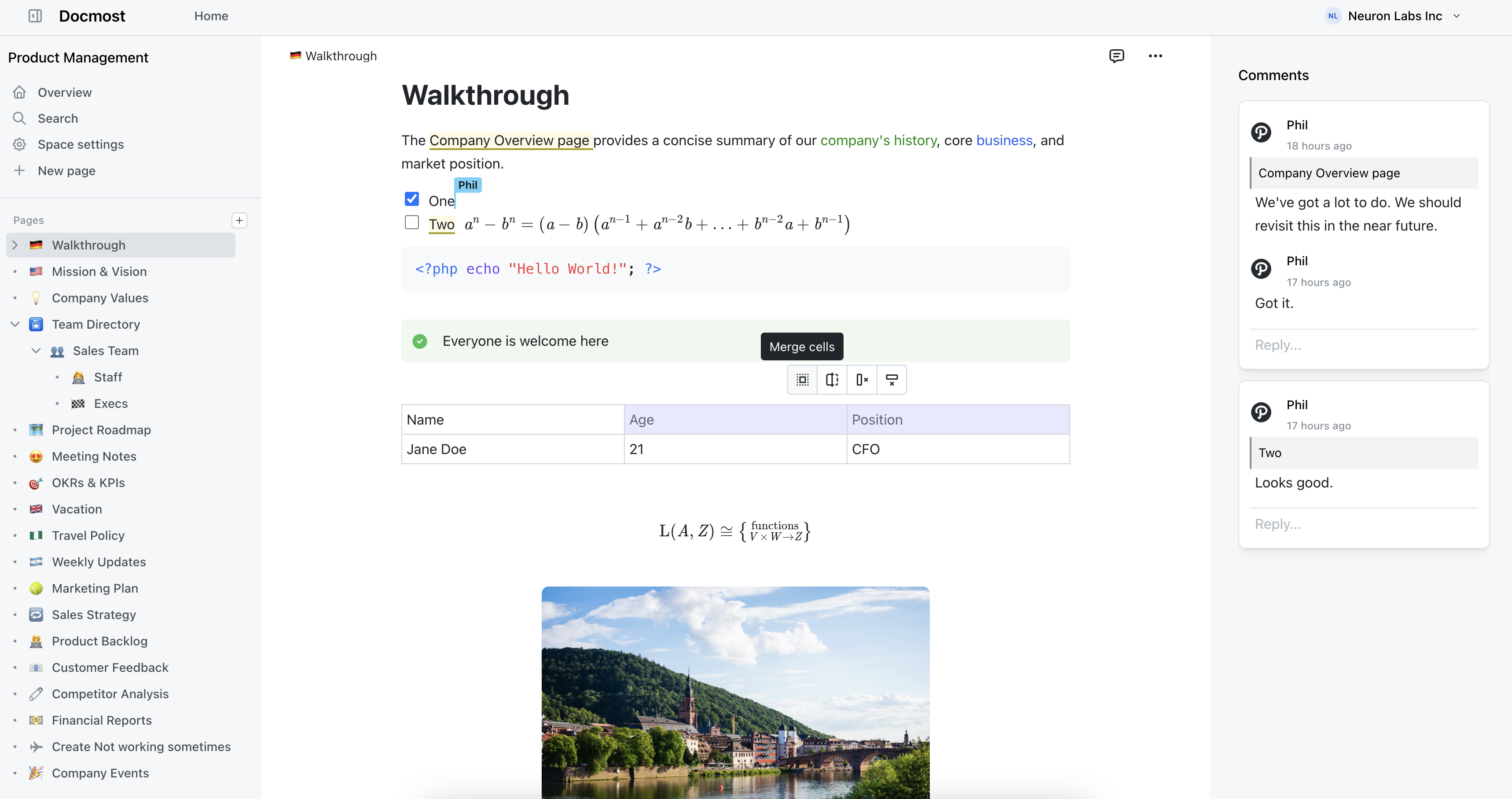
Docmost features
- Collaborative real-time editor: Work together on pages with live cursors and instant sync.
- Diagrams: Built-in support for Draw.io, Excalidraw, and Mermaid diagramming tools.
- Spaces: Organize pages by team, project, or department for cleaner separation.
- AI: Ask questions across your knowledge base, translate pages, generate summaries, or connect to other systems via MCP. Supports local LLMs for data privacy.
- Permissions management: Control who can view and edit content with role-based access.
- Groups: Grant unified permissions to users via groups.
- Comments: Add inline comments to pages for feedback and discussion.
- Page history: Track changes with version history and compare revisions.
- Nested navigation: Nest and reorder pages via the sidebar with drag-and-drop.
- Search: Full-text search across all content, including PDF and DOCX attachments.
- File attachment: Attach files to pages for quick reference.
- Import: Bring in content from Confluence, Notion, Markdown, HTML, and DOCX.
- Authentication: Email and password login built in. LDAP and SSO (SAML/OIDC) available in Enterprise edition.
2. AppFlowy
AppFlowy is an open-source Notion alternative built with Flutter and Rust. It takes the local-first approach that Obsidian users appreciate and puts it in a more structured workspace format.
Your data lives on your device by default, and you get real offline support rather than a web app that breaks when the connection drops. The editor has databases, kanban boards, calendars, and checklists. It feels more like Notion than a traditional wiki, which works well for teams that want project tracking alongside their docs.
The Rust backend means it runs fast even on older hardware. Self-hosting the server component is possible but adds complexity compared to just running the desktop app. AppFlowy Cloud is also available if you'd rather not manage infrastructure yourself.
Pros:
- Local-first with genuine offline support
- Built with Rust, fast on low-end hardware
- Open source under AGPL-3.0
- Notion-style blocks with databases and kanban boards
Cons:
- Real-time collaboration still has sync issues
- No version history, despite being requested since 2023
- Self-hosting the server side is complex
- Smaller plugin ecosystem than Obsidian
3. Affine
Affine puts documents and whiteboards in the same workspace. If you currently bounce between Obsidian for notes and Miro or FigJam for visual thinking, Affine tries to combine both.
The edgeless canvas mode lets you mix rich text, sticky notes, databases, embedded web pages, and shapes on one surface. Switch to page mode for a more traditional document editor. It's local-first with offline support, and desktop apps cover macOS, Windows, and Linux.
The visual thinking angle is what sets Affine apart. If your workflow involves a lot of brainstorming, mind mapping, or spatial organization of ideas, it fills a gap that most wiki tools ignore.
Pros:
- Documents and whiteboards in one tool
- Local-first with full offline support
- Desktop apps for all three major platforms
- Clean, modern interface
Cons:
- Server components are proprietary, so full self-hosting isn't possible
- Fewer integrations than more established tools
- Still in active development with occasional rough edges
- Collaboration features are newer and less tested
4. Anytype
Anytype takes a privacy-first approach that will appeal to Obsidian users who chose it specifically for local data storage. Everything is encrypted end-to-end and synced peer-to-peer across your devices without passing through a central server.
The data model is object-based rather than page-based. Instead of writing documents, you create objects (notes, tasks, bookmarks, contacts) with types and relations that connect them. It's a different mental model from Obsidian's file-and-folder approach, but once it clicks, the structured relationships between objects can surface connections that flat files miss.
Anytype is open source and free during its current beta phase. The team plans to introduce paid tiers for collaboration and storage later, but the core product will stay free. If privacy and encryption are your top priorities and you're willing to learn a new way of organizing information, Anytype is worth a serious look.
Pros:
- End-to-end encrypted with peer-to-peer sync
- No central server, your data stays yours
- Object-based model creates structured relationships between content
- Open source and currently free
- Available on desktop and mobile
Cons:
- The object model has a real learning curve
- No web version, you need the desktop or mobile app
- Team collaboration features are still limited
- Smaller community than Obsidian or Notion
- Long-term pricing unclear as the product matures
5. Logseq
Logseq is the closest alternative in philosophy to Obsidian. It's open source, local-first, and stores your data as plain Markdown and Org-mode files on your device. If you like Obsidian's approach but want a different editing model, Logseq is the obvious candidate.
The big difference is how you write. Logseq uses an outliner-first editor where everything is a bullet point by default. Every block is individually referenceable, which makes it easy to link ideas at a granular level. The graph view works similarly to Obsidian's, showing connections between pages and blocks.
Logseq also has a plugin system and a growing community building extensions. The whiteboard feature lets you arrange blocks, drawings, and text on a freeform canvas, which is useful for brainstorming sessions or mapping out project structures visually.
One thing to know: Logseq is in the middle of a major rewrite moving from its original ClojureScript codebase to a new database-backed architecture. The rewrite promises better performance and new features, but it also means the project is in a transitional period.
Pros:
- Open source under AGPL-3.0
- Local-first with your data stored as plain files
- Outliner model makes block-level linking natural
- Whiteboard feature for visual thinking
- Works with existing Markdown files
Cons:
- The outliner model isn't for everyone, some people hate writing in bullets
- Performance slows down with large graphs (10,000+ blocks)
- Mobile apps are functional but lag behind desktop
- Real-time team collaboration isn't there yet
6. Notion
Notion is the tool most people land on when they outgrow a personal note-taking app. It combines wikis, databases, project management, and notes in one workspace that can be shaped into almost anything.
The block-based editor handles databases, kanban boards, toggle lists, synced blocks, and embeds from dozens of tools. Templates cover nearly every use case. If your team needs one tool for documentation and project tracking, Notion has the widest feature set of any option here.
The trade-off is data ownership. Everything lives on Notion's servers. There's no self-hosting option, and offline mode exists but isn't reliable for extended use. Performance also gets sluggish once your workspace has thousands of pages with linked databases. And if you're coming from Obsidian specifically because you wanted local file storage and privacy, Notion moves you in the opposite direction.
Pros:
- Does more than anything else on this list
- Block-based editor is very flexible
- Huge template library and active community
- Integrations with Slack, GitHub, Jira, Figma, and more
Cons:
- Cloud-only, no self-hosting
- Performance degrades in large workspaces
- Can feel like overkill when all you need is a wiki
- Offline mode isn't dependable