Best Wiki Software for Government and Public Sector Teams
A state agency buys a cloud-hosted wiki. Three years in, a new data sovereignty regulation passes. The wiki vendor stores data across multiple regions and can't guarantee single-country residency. The agency has six months to migrate 8,000 pages of internal documentation to a compliant platform, while also maintaining operational continuity for 400 employees who depend on that documentation daily.
This story plays out across government organizations regularly. The procurement process took eighteen months. The deployment took six more. Now the platform doesn't meet a compliance requirement that didn't exist when the purchase order was signed. Government technology decisions have long timescales and rigid change processes, which means the initial platform choice carries more weight than it does in the private sector.
Government teams need documentation for the same reasons everyone does: standard operating procedures, policy manuals, training materials, institutional knowledge, and cross-department coordination. The difference is that government documentation sits inside a web of requirements that commercial organizations rarely face. FedRAMP authorization. Data sovereignty mandates. WCAG accessibility compliance. Procurement regulations that dictate how software can be purchased and deployed. Security clearance levels that determine who can see what.
Here are the wiki platforms that actually work in government environments, with an honest assessment of what each one handles and where it struggles.
What makes government wiki requirements different
Government IT operates under constraints that most software vendors don't think about when designing their products.
FedRAMP is the gateway for cloud services in federal agencies. If a cloud platform isn't FedRAMP authorized, most federal agencies can't use it. The authorization process takes years and costs vendors millions of dollars, which means many otherwise excellent tools are simply unavailable to federal buyers. Self-hosted software sidesteps FedRAMP entirely because it runs on government-controlled infrastructure.
Data sovereignty is a legal requirement, not a preference. Government data often must remain within national borders, and sometimes within specific networks. Some agencies operate on classified networks that are air-gapped from the public internet. Others operate on networks with strict egress controls. The wiki needs to function in these environments, not just theoretically, but in practice with no external dependencies.
WCAG accessibility is law, not a guideline. Section 508 of the Rehabilitation Act requires federal agencies to use technology that's accessible to people with disabilities. WCAG 2.1 AA compliance is the standard. A wiki that isn't accessible isn't an option, regardless of how good its other features are.
Procurement adds months or years to every decision. Government purchasing processes involve requirements documentation, vendor assessment, security review, ATO approval, and budget allocation that follows fiscal year cycles. The wiki you choose today might not be deployed for twelve months. It needs to still be a good choice when deployment day arrives.
Docmost
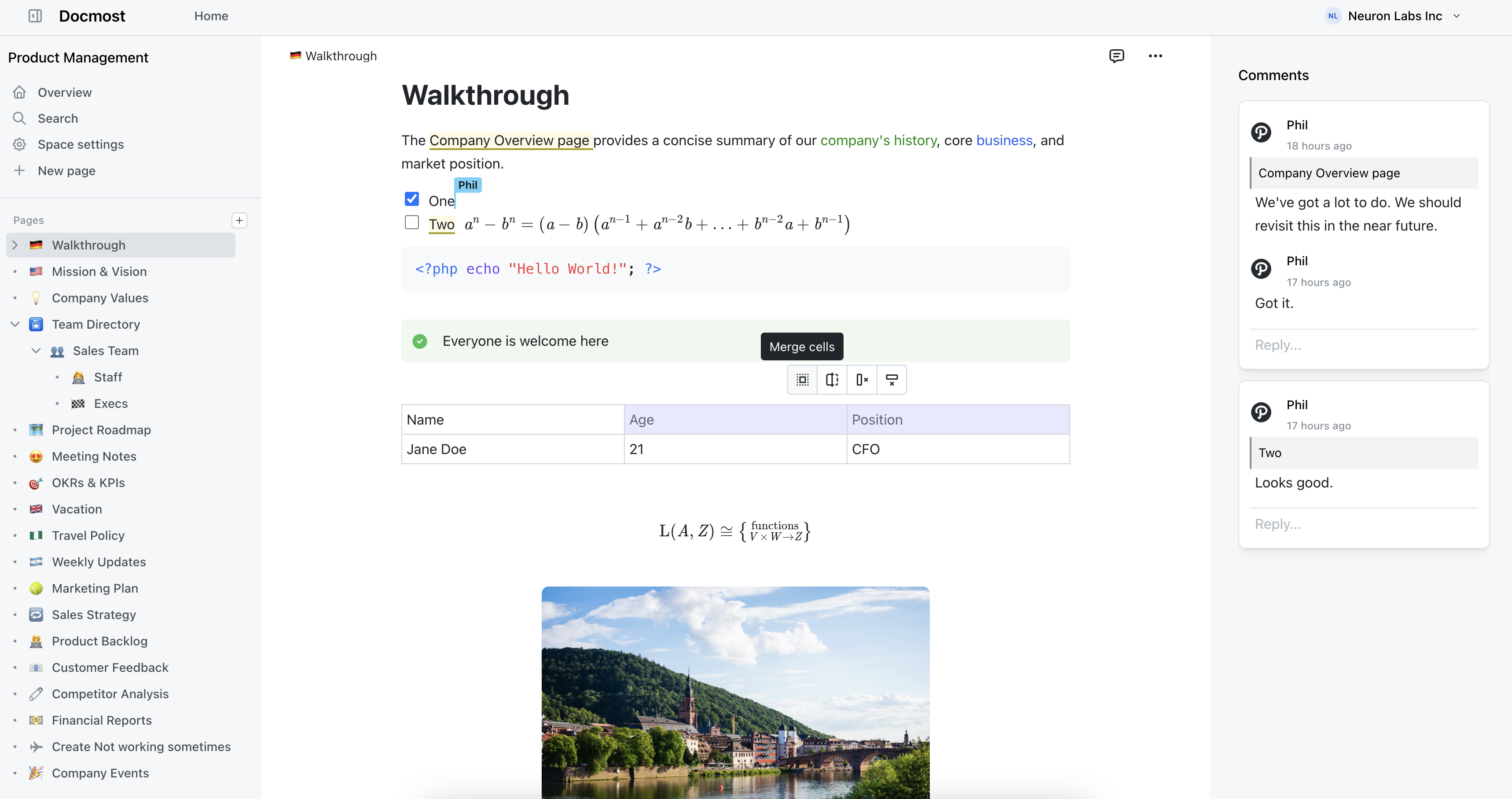
We built Docmost as a self-hosted wiki and documentation platform, and the self-hosted model is what makes it work for government. When Docmost runs on government infrastructure, data sovereignty is solved by architecture. There's no vendor holding your data. There's no cloud service to authorize through FedRAMP. The software runs on your servers, inside your network, under your security controls.
For air-gapped environments, which are common in defense and intelligence agencies, Docmost runs entirely without internet connectivity. No license verification, no telemetry, no external API calls. This isn't a workaround; it's how the platform is designed to operate. Government agencies on classified networks can deploy it without modifications.
Authentication integrates with government identity infrastructure through SAML 2.0, OIDC, and LDAP. In practice, this means integration with Active Directory, CAC/PIV card systems, and whatever identity provider the agency runs. Multi-factor authentication is built in for environments that require it, which in government is nearly everywhere.
Role-based access control works at the space, group, and user level. An agency can create spaces for different divisions, programs, or classification levels, each with appropriate access restrictions. Groups map to organizational roles, so permission management follows the existing organizational structure rather than requiring a separate access model.
Real-time collaborative editing means multiple people can work on policy drafts, SOPs, and review documents simultaneously instead of emailing versions around. Built-in diagramming through Draw.io, Excalidraw, and Mermaid supports the process flows and system diagrams standard in government documentation. The Confluence importer is relevant because many agencies are on Confluence and looking for alternatives as Data Center costs increase.
Docmost is used by organizations including the Australian Government. The project has over 2.7 million downloads.
Docmost features
- Collaborative Real-time Editor: Work together on pages in real time.
- Diagrams: Built-in support for Drawio, Excalidraw, and Mermaid diagramming tools.
- Spaces: Organize your pages by team, projects, or departments for better collaboration.
- AI: Ask questions across your knowledge base, translate pages, generate summaries, or connect to other systems via MCP.
- Permissions Management: Easily control access to pages with easy-to-understand permissions.
- Groups: Easily grant unified permissions to users via groups.
- Comments: Add inline comments to pages for better communication and feedback.
- Page History: Track changes with a comprehensive version history.
- Nested Navigation: You can nest and reorder pages via the sidebar.
- Search: Quickly find the information you need with powerful search capabilities.
- File Attachment: Attach files to your pages for quick reference and sharing.
- Attachments search: Full-text search and indexing of content in PDF and DOCX file attachments.
- Embeds: Embed content from Airtable, Loom, YouTube, and more.
- Authentication: Email and password, LDAP and SSO login (SAML/OIDC) in the Enterprise edition.
Can Wiki Software Run on Air-Gapped Government Networks?
It can, but most options on the market can't. Cloud wiki tools like Notion and Confluence Cloud need a constant internet connection to work. That's a dealbreaker for classified networks, ITAR environments, and any facility where systems aren't allowed to touch the public internet.
Air-gapped deployment means the wiki runs entirely inside a secure network boundary with zero outbound connections. No API calls going out, no telemetry reaching a vendor, no reliance on external CDNs to load assets. The software has to be fully installable and functional without ever reaching the internet.
Docmost was built with this in mind. It runs on your infrastructure with no external dependencies, and it works the same way on a disconnected classified network as it does on a connected one. Collaboration, search, attachments, diagramming tools, all of it works offline. That's a big part of why organizations like the Australian Government and defense contractors have adopted it.
For most defense and intelligence teams, the air-gap question is the first filter. If a tool can't pass it, nothing else matters.
What Compliance Standards Should a Government Wiki Meet?
That depends on your agency and what you handle, but there's a common set of frameworks that come up again and again. U.S. federal agencies typically need to align with FISMA, NIST 800-53, and FedRAMP. If you're dealing with export-controlled data, ITAR enters the picture. EU agencies need GDPR compliance. And state and local governments often layer their own data residency and records retention rules on top of everything else.
What this actually means for your wiki is pretty concrete. You need encryption at rest and in transit. You need granular access controls. You need audit logs. And above all, you need to run the software on infrastructure you control. Self-hosted, on-premises deployment is what makes compliance realistic, because you're enforcing your own security posture instead of hoping a vendor's is good enough.
Docmost checks these boxes. It supports SSO through SAML 2.0 and OIDC, plugs into LDAP, offers space-level permissions, and keeps full version history. And it all lives on your servers.
Why Do Government Agencies Pick Self-Hosted Wikis Over Cloud Options?
It comes down to control. When your wiki runs on a vendor's infrastructure, your data sits on servers you didn't pick, in locations you might not be able to verify, managed by people you didn't vet. If your agency is bound by data residency requirements or handles sensitive information, there are too many variables outside your control.
Self-hosted software flips that. You choose the servers, the network segment, the backup strategy, and who gets physical and logical access. There's no multi-tenant risk, no vendor employees with access to your data, and no surprises if a cloud provider changes their pricing or gets acquired.
Docmost runs entirely on your infrastructure. Your IT team owns the deployment, the data, and the upgrade schedule. Nothing leaves your perimeter unless you want it to.
What's the Best Confluence Replacement for Government Teams?
This one's gotten urgent. Atlassian is ending Confluence Data Center, and that was the go-to option for government agencies that needed Confluence but couldn't put their data in the cloud. Now those teams need a self-hosted alternative, and Confluence Cloud doesn't solve the problem. It puts data on Atlassian's infrastructure, which won't fly for agencies with data residency or air-gap requirements.
Docmost is the closest thing to a straight replacement. You get real-time collaborative editing, spaces for organizing content by team or department, nested pages, inline comments, and diagramming through Draw.io, Excalidraw, and Mermaid. There's a dedicated Confluence importer that preserves your page hierarchy and attachments, so you're not spending months rebuilding documentation by hand. It supports SSO, LDAP, and fine-grained permissions, deploys on Docker, and runs fully on-premises.
How Does On-Premises Wiki Software Handle Version Control and Audit Trails?
Government teams need to show who changed what and when. That's true whether you're dealing with an inspector general review, a FOIA request, or a routine internal audit.
A solid on-premises wiki keeps full page history with timestamps, author attribution, and the ability to view or roll back to any previous version. For government use, this isn't a nice-to-have. It's table stakes.
Docmost logs revisions automatically. Each edit is recorded with the author and a timestamp, and older versions stay accessible. Pair that with its permissions system and you can show not just what changed, but that only the right people had the ability to make changes in the first place. That combination of version history and access control is what auditors actually want to see.
Can Government Wiki Software Plug into Existing Identity Systems?
It needs to. Government agencies run centralized identity providers, and any tool that forces you to manage separate credentials is creating both a security hole and busywork for your admins.
The baseline here is SAML 2.0, OpenID Connect, and LDAP. That covers most government identity setups, including Active Directory. Docmost's enterprise edition integrates with all three, so your people log in through the same identity provider they already use for everything else. No separate accounts, no extra passwords, and your existing access policies carry over.
Is Self-Hosted Wiki Software Difficult to Set Up and Maintain?
Some of it is, honestly. Legacy platforms like MediaWiki and XWiki can demand a fair amount of server administration, plugin wrangling, and ongoing care. That eats into staff time, and government IT teams are usually stretched thin already.
Newer self-hosted wikis have gotten much simpler. Docmost runs on Docker, so you can get it up and running in minutes on any server that supports containers. Updating is a pull-and-restart. There's no plugin ecosystem to babysit, no Java stack to tune, and no elaborate server configuration to maintain. It was built for high availability from the start, so scaling across your infrastructure doesn't mean rethinking the whole deployment.
When your team is already juggling a dozen other systems, the wiki shouldn't be the one that keeps generating support tickets.
How Do Government Teams Move Existing Documentation Into a New Wiki?
Migration is where these projects tend to get stuck. Most agencies have years of content spread across Confluence, SharePoint, shared drives, and legacy intranet systems that nobody fully remembers building. Moving all of that by hand isn't practical.
What helps is a platform with built-in importers. Docmost handles imports from Confluence, Notion, Markdown, and HTML. The Confluence importer keeps your page structure and attachments intact, which matters a lot when you're dealing with hundreds or thousands of pages. If your content is locked in SharePoint or a custom system, the usual path is to export it as HTML or Markdown first, then bring it into Docmost.
Worth noting: migration is also a good chance to clean house. Most agencies discover that a big chunk of their existing wiki is outdated and not worth carrying over.