Top 5 GitBook Alternatives
GitBook started as an open-source tool for writing technical documentation using Markdown and Git. Over the years it pivoted into a cloud-hosted platform aimed at product teams and developer documentation. The current version is polished, fast, and well-suited for public-facing docs sites. If all you need is to publish clean API documentation or a developer knowledge base, GitBook does that well.
But GitBook has real constraints that push teams to look elsewhere. There is no self-hosting option, so your content lives on GitBook's servers. The free plan is limited and pricing scales with the number of users, which gets expensive for larger teams. The editor, while clean, is Markdown-only with no rich-text alternative, which is a barrier for non-technical contributors. Real-time collaboration exists but feels limited compared to tools built around it from the start. And if you need your wiki to handle more than documentation, like internal knowledge management, onboarding materials, or project notes, GitBook starts feeling narrow.
If any of those limitations matter to you, here are five alternatives worth considering.
1. Docmost
Docmost is an enterprise-ready, self-hosted wiki and documentation platform licensed under AGPL-3.0, with a commercial license for enterprises with more needs. If you are moving off GitBook because you want data ownership and a richer editing experience, Docmost addresses both directly.
The editor is block-based and rich-text. No Markdown required, though the editor accepts Markdown shortcuts if that is your preference. You write, you format, and it works the way you would expect from something like Google Docs or Notion. Real-time collaboration is built in, so multiple people can edit the same page simultaneously and see each other's changes live. If you have been frustrated by GitBook's limited collaboration, this is a significant step up.
Content is organized into spaces with nested pages, which gives you a clean hierarchy for different teams, projects, or documentation sets. Permissions are managed at the space and group level, so you are not configuring access page by page. There is built-in diagramming with Draw.io, Excalidraw, and Mermaid, inline comments, page history, and search that works across your entire workspace including full-text indexing of PDF and DOCX attachments.
Authentication covers email and password, LDAP, and SSO via SAML and OIDC. You do not need to wire up a third-party provider just to let your team log in.
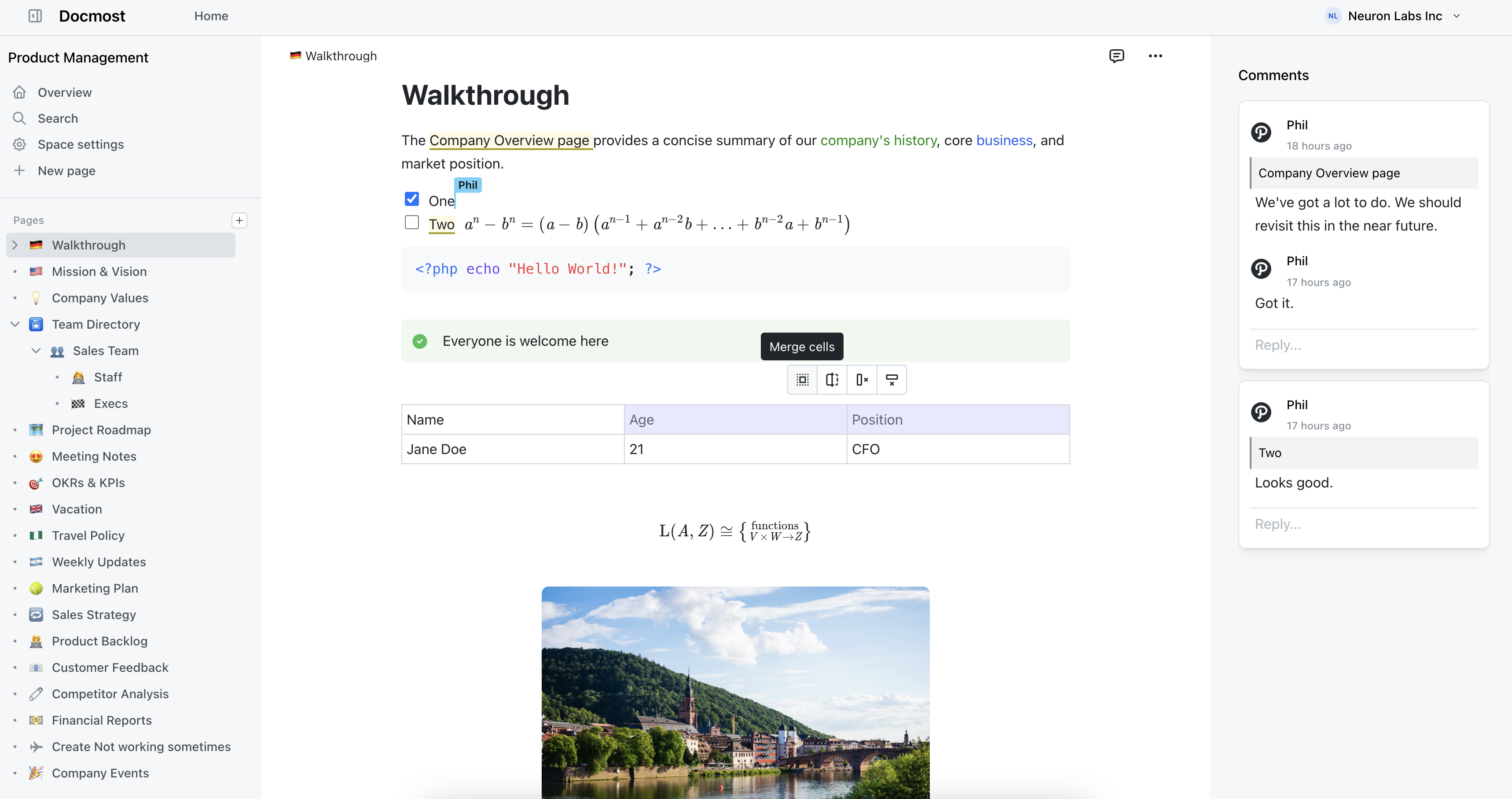
Docmost features
- Collaborative Real-time Editor: Work together on pages in real time.
- Diagrams: Built-in support for Drawio, Excalidraw, and Mermaid diagramming tools.
- Spaces: Organize your pages by team, projects, or departments for better collaboration.
- AI: Ask questions across your knowledge base, translate pages, generate summaries, or connect to other systems via MCP.
- Permissions Management: Easily control access to pages with easy-to-understand permissions.
- Groups: Easily grant unified permissions to users via groups.
- Comments: Add inline comments to pages for better communication and feedback.
- Page History: Track changes with a comprehensive version history.
- Nested Navigation: You can nest and reorder pages via the sidebar.
- Search: Quickly find the information you need with powerful search capabilities.
- File Attachment: Attach files to your pages for quick reference and sharing.
- Attachments search: Full-text search and indexing of content in PDF and DOCX file attachments.
- Embeds: Embed content from Airtable, Loom, YouTube, and more.
- Authentication: Email and password, LDAP and SSO login (SAML/OIDC) in the Enterprise edition.
2. Wiki.js
Wiki.js is a Node.js-based wiki built as a modern alternative to older wiki software. It is fast, looks good by default, and Docker-based installation makes deployment straightforward. If you are leaving GitBook because you want self-hosting and Git integration, Wiki.js gives you both.
The editor supports Markdown and visual editing. It stores content in a proper database (PostgreSQL, MySQL, MariaDB, SQLite, or MS SQL) but also supports Git-based storage and sync, which makes it appealing for teams that liked GitBook's Git workflow. Authentication covers GitHub, Google, Microsoft, LDAP, and SAML. Search uses a built-in engine with optional Elasticsearch for larger deployments.
One thing to know: Wiki.js 3.0 has been in development for a long time. The current stable version (2.x) works well but has not seen major feature updates recently. The existing feature set handles most use cases, but if you need a project that is actively shipping improvements, factor that in.
Pros:
- Git-based storage and sync for version control
- Clean, modern interface out of the box
- Flexible database support
- Wide authentication coverage including LDAP and SAML
- Easy Docker deployment
Cons:
- Version 3.0 has been in development for years
- No real-time collaboration
- Current stable version is not getting major updates
3. BookStack
BookStack enforces a fixed content structure: Shelves hold Books, Books hold Chapters, and Chapters hold Pages. For teams coming from GitBook who valued its clean organization, BookStack provides a similar sense of order through a different model. Everyone knows where content goes because the structure dictates it.
The editor supports both WYSIWYG and Markdown, with Draw.io integration for diagrams. Search works well even with large volumes of pages. The permission model is role-based and straightforward. Authentication supports Okta, Google, GitHub, LDAP, and others.
BookStack runs on PHP and Laravel. A basic LAMP stack is all you need. It installs in minutes and has shipped consistent monthly releases since 2015. The documentation is thorough and the community is active. If you want a self-hosted wiki that is simple to run and maintain, BookStack is one of the safest bets.
The trade-off is the rigidity. The Shelf/Book/Chapter/Page model works well for structured documentation but less well for freeform knowledge bases. There is also no real-time collaboration.
Pros:
- MIT licensed and fully open source
- Easy to self-host on a basic LAMP stack
- Fixed structure keeps content organized at scale
- WYSIWYG and Markdown editors with Draw.io
- Consistent monthly releases since 2015
Cons:
- No real-time collaboration
- Rigid hierarchy will not suit every use case
- Interface looks dated next to newer tools
4. Mintlify
Mintlify is the closest alternative to GitBook in terms of what it is built for: developer documentation. If you are leaving GitBook but still need a polished, public-facing docs site with API reference support, Mintlify targets that exact use case.
You write in MDX (Markdown with React components), and Mintlify generates a clean documentation site from your content. It integrates with GitHub for version control, supports API playground features, has built-in analytics to see which pages get traffic, and handles custom domains. The output looks professional with minimal configuration.
The limitation is scope. Mintlify is a docs platform, not a wiki or knowledge base. It is not designed for internal team documentation where you need permissions, collaboration, or private spaces. If you need both public docs and internal knowledge management, you will need Mintlify plus something else. Pricing is also usage-based and can scale quickly for larger documentation sets.
Pros:
- Purpose-built for developer documentation
- Clean output with minimal configuration
- GitHub integration for version control
- Built-in analytics and API playground
Cons:
- Only for public-facing docs, not internal wikis
- No self-hosting
- MDX-based, so non-technical users may struggle
- Pricing scales with usage
5. Archbee
Archbee is a cloud-hosted documentation platform focused on knowledge portals for both internal teams and external users. If you are leaving GitBook because you need something that handles both customer-facing docs and internal knowledge management under one roof, Archbee covers that ground.
The editor is block-based with support for reusable content snippets, variables, and custom blocks. You can publish documentation to a custom domain with full branding control, which makes it a viable replacement for GitBook's public docs capabilities. Archbee also supports API documentation, versioning, and localization, so teams managing multi-language or multi-version docs have what they need without bolting on extra tools.
Collaboration features include a review system, branching (similar to Git branches but for documentation), and multiplayer editing. The AI assistant can answer questions using your published documentation, which cuts down on repetitive support queries. Authentication includes SSO via SAML and OIDC on the enterprise plan.
The drawback is cost. Plans start at $80/month and scale to $350/month before you reach enterprise pricing. There is no free tier beyond a 14-day trial, and no self-hosting option. If budget or data ownership is a concern, Archbee may not be the right fit.
Pros:
- Handles both public and internal documentation
- Reusable snippets, variables, and versioning
- Branching workflow for content changes
- AI assistant for answering user questions
- Custom domain publishing with full branding
Cons:
- No self-hosting option
- No free plan, only a 14-day trial
- Pricing starts at $80/month and scales quickly
- Enterprise features like SSO locked to higher tiers
Which one replaces GitBook?
It depends on what you need beyond what GitBook offers.
If the main issue is data ownership and you want a modern editing experience with real-time collaboration, Docmost is the most complete self-hosted option. You get a rich-text editor, proper permissions, diagramming, and enterprise authentication without hosting your content on someone else's infrastructure.
If you specifically need public-facing developer docs with API references, Mintlify is the closest match to GitBook's core use case. If you want a self-hosted wiki with Git-based workflows, Wiki.js bridges that gap. If you need a cloud platform that handles both public docs and internal knowledge with features like versioning and localization, Archbee is worth evaluating. And if you want the simplest self-hosted setup with a structure that keeps things organized, BookStack gets you there fast.