Top 6 Dokuwiki Alternatives
DokuWiki has been around since 2004. It stores everything in plain text files, requires no database, and runs on pretty much any PHP host. For a long time, that simplicity was its best feature. You could install it in minutes, back it up by copying a folder, and get a functional wiki without touching a database config.
But the things that made DokuWiki appealing in 2004 are the same things holding it back now. The editor uses a custom wiki syntax that new team members have to learn before they can contribute anything. There's no real-time collaboration, so two people editing the same page means someone loses their work. The plugin ecosystem, while large, is inconsistently maintained, and many popular plugins haven't been updated in years. The interface looks like it was designed for a different era of the web, because it was. And if you want features like inline comments, proper permissions, or SSO, you're stacking plugins on top of plugins and hoping they all play nice together.
If you've hit the ceiling with DokuWiki, whether it's the editing experience, the lack of collaboration features, or just the maintenance overhead of keeping everything working, here are six alternatives worth evaluating.
1. Docmost
Docmost is an enterprise-ready, self-hosted wiki and documentation platform licensed under AGPL-3.0, with a commercial license for enterprises with more needs. If you're coming from DokuWiki and the main thing you want is a modern editing experience with proper collaboration, Docmost is the most direct upgrade available.
The editor is block-based and rich-text. No wiki syntax, no toggling between edit and preview modes. You write, you format, and it works the way you'd expect from something like Google Docs or Notion. Real-time collaboration is built in, so multiple people can work on the same page simultaneously and see each other's changes as they happen. If you've dealt with DokuWiki's locking mechanism where one person edits and everyone else waits, this alone changes how your team works.
Content is organized into spaces with nested pages, giving you a clean hierarchy that scales better than DokuWiki's namespace system. Permissions are managed at the space and group level, which means you don't have to configure ACLs page by page. There's built-in support for diagramming with Draw.io, Excalidraw, and Mermaid, so you can create flowcharts and architecture diagrams without leaving the editor. Search works across your entire workspace, including full-text indexing of PDF and DOCX attachments.
Authentication covers the enterprise basics out of the box: email and password, LDAP, and SSO via SAML and OIDC. No need to bolt on a third-party auth provider just to let your team log in.
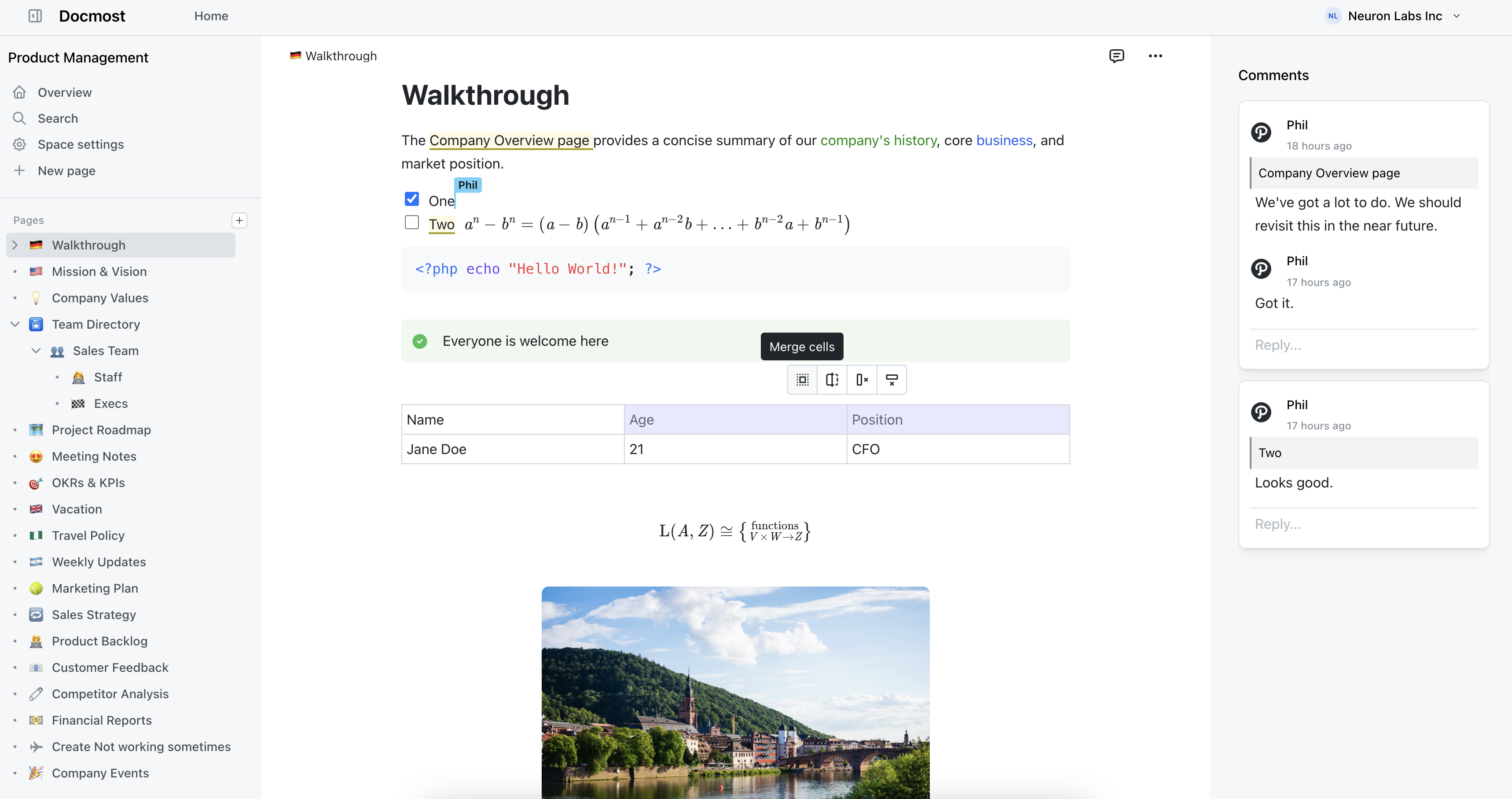
Docmost features
- Collaborative Real-time Editor: Work together on pages in real time.
- Diagrams: Built-in support for Drawio, Excalidraw, and Mermaid diagramming tools.
- Spaces: Organize your pages by team, projects, or departments for better collaboration.
- AI: Ask questions across your knowledge base, translate pages, generate summaries, or connect to other systems via MCP.
- Permissions Management: Easily control access to pages with easy-to-understand permissions.
- Groups: Easily grant unified permissions to users via groups.
- Comments: Add inline comments to pages for better communication and feedback.
- Page History: Track changes with a comprehensive version history.
- Nested Navigation: You can nest and reorder pages via the sidebar.
- Search: Quickly find the information you need with powerful search capabilities.
- File Attachment: Attach files to your pages for quick reference and sharing.
- Attachments search: Full-text search and indexing of content in PDF and DOCX file attachments.
- Embeds: Embed content from Airtable, Loom, YouTube, and more.
- Authentication: Email and password, LDAP and SSO login (SAML/OIDC) in the Enterprise edition.
2. BookStack
BookStack enforces a fixed content structure: Shelves contain Books, Books contain Chapters, and Chapters contain Pages. If your DokuWiki instance has devolved into a maze of namespaces that nobody can navigate, that rigidity is a feature. Everyone knows where things go because the structure tells them.
The editor supports both WYSIWYG and Markdown, with Draw.io integration for diagrams. No wiki syntax to learn. Search works well across large collections. The permission model is role-based and covers what most teams need without hours of configuration. Authentication supports Okta, Google, GitHub, LDAP, and others.
It's built on PHP and Laravel, so the hosting requirements are familiar if you're already running DokuWiki. A basic LAMP stack is all you need. Installation takes minutes. BookStack has shipped consistent monthly releases since 2015, so it's well-maintained and thoroughly documented.
The trade-off is flexibility. The Shelf/Book/Chapter/Page hierarchy works great for documentation, manuals, and knowledge bases. If you need something more freeform, like a project wiki where content doesn't fit into "books," you'll feel constrained. There's also no real-time collaboration.
Pros:
- MIT licensed and fully open source
- Simple to self-host on a LAMP stack
- Fixed structure keeps content organized as it grows
- WYSIWYG and Markdown editors with Draw.io
- Consistent monthly releases and solid documentation
Cons:
- No real-time collaboration
- The rigid hierarchy won't suit every use case
- Interface looks dated compared to newer tools
3. Wiki.js
Wiki.js is a Node.js-based wiki built from scratch as a modern alternative to the older PHP wikis. It's fast, it looks good by default, and Docker-based installation is about as painless as self-hosted software gets.
The editor supports both Markdown and visual editing. It runs on PostgreSQL, MySQL, MariaDB, SQLite, or MS SQL, so you have flexibility in how you deploy it. Authentication covers GitHub, Google, Microsoft, LDAP, and SAML. Search is handled by a built-in engine with optional Elasticsearch for larger deployments. The permissions system is role-based and reasonably flexible without being overwhelming.
Coming from DokuWiki, Wiki.js will feel like a significant step up in terms of both the interface and the feature set. You get a proper database-backed wiki with modern auth, solid search, and an editor that doesn't require learning markup syntax.
One thing to be aware of: Wiki.js 3.0 has been in development for a long time. The current stable version (2.x) is solid but hasn't seen major feature updates recently. The existing feature set is complete enough for most use cases, but if you need a project that's actively shipping improvements, factor that into your decision.
Pros:
- Clean, modern interface out of the box
- Flexible database support (PostgreSQL, MySQL, SQLite, and more)
- Wide authentication coverage including LDAP and SAML
- Easy Docker-based deployment
Cons:
- Version 3.0 has been in development for years with uncertain timeline
- No real-time collaboration
- Current stable version isn't receiving major updates
4. XWiki
XWiki is where you look when your requirements list is long and specific. It's a Java-based open source wiki that has been around since 2004, and it leans hard into customization. Where DokuWiki gives you a simple flat-file wiki with plugins, XWiki gives you a platform you can build on.
There's an extension ecosystem with hundreds of plugins, and the application development framework lets you create custom workflows, forms, and structured data within the wiki itself. If you need a wiki that also functions as a lightweight internal app platform, XWiki can handle it. It supports WYSIWYG editing, Markdown, and wiki syntax. Access controls are granular. Pages are organized hierarchically with nested spaces.
The trade-off is complexity. XWiki demands more from whoever is running it. Installation, configuration, and ongoing maintenance require real technical effort, more than DokuWiki ever did. The Java stack is heavier than PHP, and the interface, while functional, still feels more like an enterprise tool than something your team will enjoy using day to day. If you don't need the customization, XWiki can feel like overkill.
Pros:
- Highly extensible with hundreds of plugins
- Built-in application development framework
- Granular access controls and nested spaces
- Long track record and active development since 2004
Cons:
- Steep learning curve for admins and users alike
- Heavy Java-based stack to maintain
- Interface feels dated
- Overkill for teams that just need a wiki
5. Notion
Notion is the tool that half the productivity space is chasing. Wikis, project management, databases, notes, all in one workspace that bends to fit almost any workflow. If your DokuWiki was trying to do more than just documentation and falling short, Notion handles the breadth better than anything else on this list.
The block-based editor supports linked databases, toggle lists, synced blocks, embeds, and more. There are templates for everything. Integrations cover Slack, GitHub, Jira, Figma, Google Drive, and dozens of others. For teams that want a single tool for knowledge management and project tracking, Notion has the widest feature range available.
The downsides are real though. Notion is cloud-only, so your data lives on their servers. There's no self-hosting option, which rules it out for teams with strict data residency requirements. Performance degrades in large workspaces with heavily linked databases. And the offline mode exists but isn't reliable enough to depend on.
Pros:
- Does more than any other tool on this list
- Block-based editor is very flexible
- Huge template library and active community
- Integrations with most tools you already use
Cons:
- Cloud-only, no self-hosting
- Performance gets sluggish in large workspaces
- Overkill when all you need is a wiki
- Offline mode is unreliable
6. AppFlowy
AppFlowy is an open source Notion alternative built with Flutter and Rust. It takes a local-first approach, meaning your data lives on your device by default and syncs when you connect. If you're leaving DokuWiki partly because of data ownership concerns with cloud tools, AppFlowy keeps everything under your control while giving you a modern interface.
The editor is block-based with support for databases, kanban boards, calendars, and checklists. It works offline by default, which is unusual for tools in this category. There are native desktop apps for macOS, Windows, and Linux. The experience feels closer to Notion than to a traditional wiki, so it works well for teams that want project management mixed in with their documentation.
AppFlowy is younger than most tools on this list, and the feature set reflects that. Real-time collaboration still has sync issues. There's no version history. Self-hosting the server components adds complexity. It's a promising tool with an active development community, but if you need something battle-tested today, keep those gaps in mind.
Pros:
- Local-first with genuine offline support
- Built with Rust, fast even on lower-end hardware
- Open source under AGPL-3.0
- Native desktop apps for all major platforms
Cons:
- Real-time collaboration still has sync issues
- No version history
- Self-hosting is complex
- Feature set still maturing
Which one replaces DokuWiki?
That depends on what's pushing you away from it.
If the main problems are the editing experience and collaboration, Docmost is the most direct upgrade. You get a modern rich-text editor, real-time co-editing, and a clean organizational structure without any of the wiki-syntax baggage. It's self-hosted, properly open source, and handles authentication, permissions, and diagramming out of the box.
If you want the simplest possible migration with minimal learning curve and a fixed structure that keeps things organized, BookStack is hard to beat. If your requirements are complex and you need deep customization, XWiki can handle it but expect to invest in administration. If you want a polished all-in-one workspace and don't mind cloud hosting, Notion covers the widest ground.
Whatever you pick, moving off DokuWiki means your team stops fighting the tool and starts using it. That's the point.