Top 5 Coda Alternatives
Coda combines documents, spreadsheets, and app-building into a single workspace. You start with a doc, add tables with formulas, wire up automations, and build interactive workflows without writing code. For teams that need more than a static wiki, Coda offers a level of flexibility that most documentation tools cannot match.
The trade-offs become clear as you dig in. Coda is cloud-only with no self-hosting option. Performance slows down as docs grow in complexity, especially with large tables and cross-doc references. The learning curve for automations and formulas is steep for non-technical users. Pricing charges per "Doc Maker" starting at $10/month, which sounds reasonable until you realize anyone who needs to create a new page has to be a Doc Maker. SSO and advanced access controls are locked to the enterprise tier. And while Coda can serve as a wiki, it was built as a workflow tool first, so basic knowledge management tasks often feel over-engineered.
If you need something simpler, more focused, or self-hosted, here are five alternatives worth considering.
1. Docmost
Docmost is an enterprise-ready, self-hosted wiki and documentation platform licensed under AGPL-3.0, with a commercial license for enterprises with more needs. If you are leaving Coda because your team mostly needs a knowledge base and the workflow automation features are overkill, Docmost gives you a focused tool that does documentation well.
The editor is block-based and supports rich text. Real-time collaboration is built in, so multiple people can edit the same page and see changes live. This matches what Coda offers for editing but without the complexity of formulas and automations getting in the way of people who just want to write and organize information.
Content is organized into spaces with nested pages, which gives you a clean hierarchy for teams, projects, or departments. Permissions are managed at the space and group level. There is built-in diagramming with Draw.io, Excalidraw, and Mermaid, inline comments, page history, and search that works across your entire workspace including full-text indexing of PDF and DOCX attachments. AI features let you ask questions across your knowledge base, generate summaries, translate pages, and connect to external systems via MCP.
Authentication supports email and password, LDAP, and SSO via SAML and OIDC. You do not need to be on an enterprise plan to get basic security features.
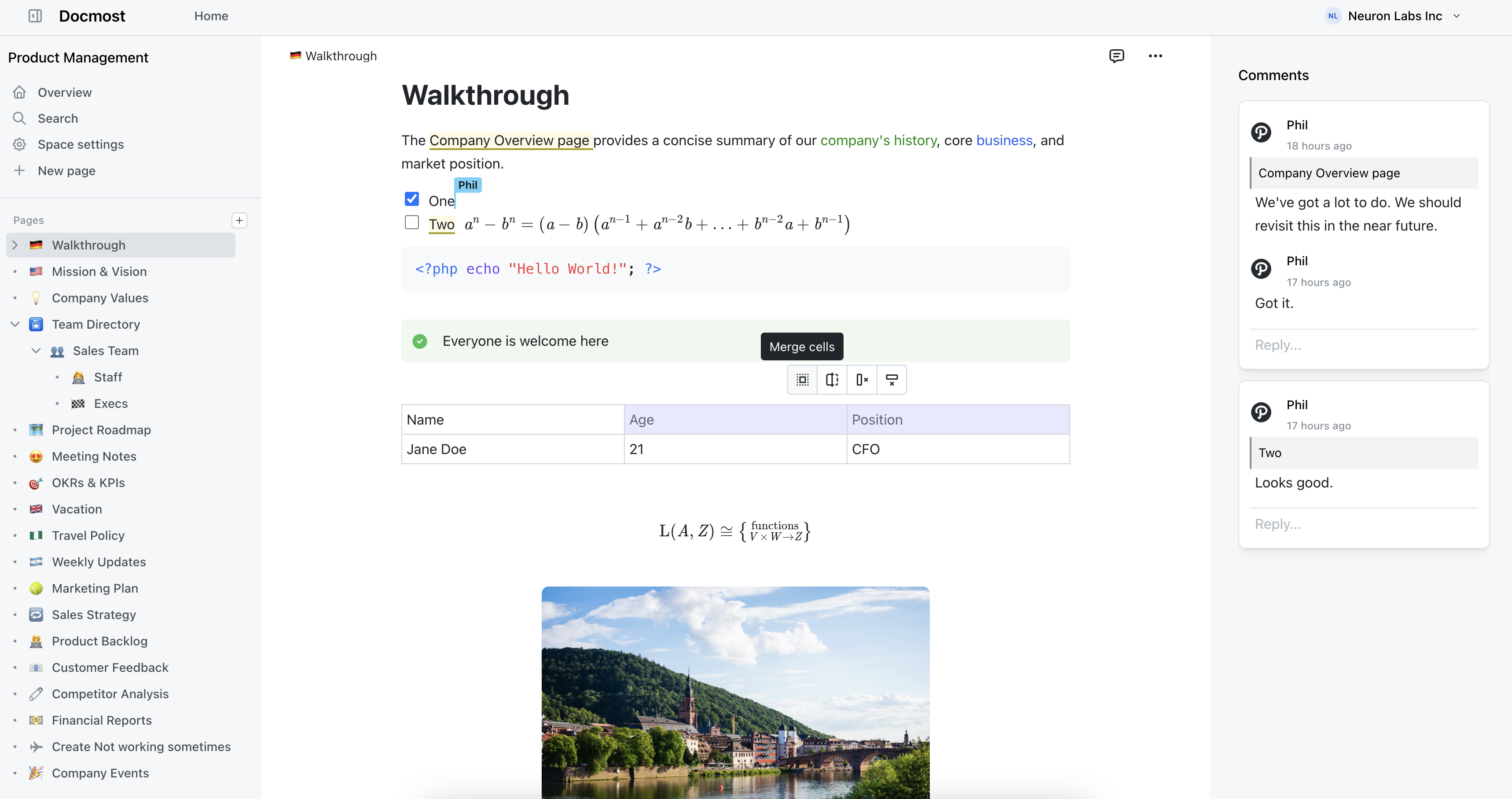
Docmost features
- Collaborative Real-time Editor: Work together on pages in real time.
- Diagrams: Built-in support for Drawio, Excalidraw, and Mermaid diagramming tools.
- Spaces: Organize your pages by team, projects, or departments for better collaboration.
- AI: Ask questions across your knowledge base, translate pages, generate summaries, or connect to other systems via MCP.
- Permissions Management: Easily control access to pages with easy-to-understand permissions.
- Groups: Easily grant unified permissions to users via groups.
- Comments: Add inline comments to pages for better communication and feedback.
- Page History: Track changes with a comprehensive version history.
- Nested Navigation: You can nest and reorder pages via the sidebar.
- Search: Quickly find the information you need with powerful search capabilities.
- File Attachment: Attach files to your pages for quick reference and sharing.
- Attachments search: Full-text search and indexing of content in PDF and DOCX file attachments.
- Embeds: Embed content from Airtable, Loom, YouTube, and more.
- Authentication: Email and password, LDAP and SSO login (SAML/OIDC) in the Enterprise edition.
2. Notion
Notion is the most direct alternative to Coda. Both tools combine documents, databases, and workflows in a single workspace. If you are leaving Coda but still want that combination of features, Notion is the first place to look.
The block-based editor handles pages, databases, toggle lists, synced blocks, templates, and embeds. Databases in Notion work differently from Coda's tables. They are more visual and easier to set up, though less powerful for complex formulas and automations. Integrations cover Slack, GitHub, Jira, Figma, Google Drive, and dozens more. The template gallery is massive and the community is one of the largest in the productivity tool space.
Notion also has a dedicated wiki feature with page verification, which makes it more suitable for knowledge management than Coda's doc-first approach. Pricing is simpler too: per user, not per Doc Maker, so everyone on your team gets the same capabilities.
The downsides mirror Coda in some ways. Cloud-only, no self-hosting. Performance degrades in workspaces with lots of linked databases. Offline support exists but is not reliable. And if you relied heavily on Coda's formula language and automations, Notion's equivalents are less capable.
Pros:
- Closest feature match to Coda's doc-plus-database model
- Dedicated wiki feature with page verification
- Simpler per-user pricing
- Massive template library and active community
- Integrations with most tools teams already use
Cons:
- Cloud-only, no self-hosting
- Less powerful formulas and automations than Coda
- Performance issues in large workspaces
- Offline mode is unreliable
3. AppFlowy
AppFlowy is an open-source workspace that positions itself as a privacy-focused alternative to tools like Notion and Coda. If you are leaving Coda because you want something open source that still offers documents and databases in one place, AppFlowy is one of the few projects attempting that combination.
The editor is block-based with support for rich text, checklists, code blocks, and basic database views including grids, boards, and calendars. It is built with Flutter and Rust, which gives it a native desktop feel on Mac, Windows, and Linux. There is also a cloud-hosted option if you do not want to manage your own infrastructure.
AppFlowy supports offline-first usage, which is a genuine advantage over Coda. Your data stays local by default, and sync happens when you are connected. For teams that care about data ownership and want a Notion-style workspace they can run themselves, AppFlowy is an appealing option.
The trade-off is maturity. AppFlowy is still a young project. The database features are basic compared to Coda's tables and formulas. There are no automations, no integrations with third-party tools, and the collaboration features are limited. If you need something production-ready for a large team, AppFlowy may not be there yet.
Pros:
- Open source with self-hosting option
- Offline-first with local data storage
- Documents and databases in one workspace
- Native desktop apps for Mac, Windows, and Linux
- Active development and growing community
Cons:
- Still maturing, limited feature set compared to Coda
- No automations or third-party integrations
- Collaboration features are basic
- Database views are simple compared to Coda's tables
4. BookStack
BookStack is a self-hosted wiki that organizes content with a fixed hierarchy: Shelves hold Books, Books hold Chapters, and Chapters hold Pages. If you used Coda primarily as a knowledge base and want something structured and easy to maintain on your own infrastructure, BookStack is a reliable option.
The editor supports both WYSIWYG and Markdown, with Draw.io integration for diagrams. Search works well even across large volumes of content. The permission model is role-based and straightforward. Authentication supports Okta, Google, GitHub, LDAP, and others.
BookStack runs on PHP and Laravel. A basic LAMP stack is all you need. It installs in minutes and has shipped consistent monthly releases since 2015. For teams that want a self-hosted wiki with minimal operational overhead, BookStack is one of the easiest options to deploy and keep running.
The trade-off is that BookStack is a wiki and nothing more. No databases, no automations, no real-time collaboration. The rigid Shelf/Book/Chapter/Page structure keeps things organized but can feel limiting for teams that want more flexibility in how they arrange content.
Pros:
- MIT licensed and fully open source
- Easy to self-host on a basic LAMP stack
- Fixed structure keeps content organized
- WYSIWYG and Markdown editors with Draw.io
- Consistent monthly releases since 2015
Cons:
- No databases or automations
- No real-time collaboration
- Rigid hierarchy may feel limiting
- Interface looks dated compared to newer tools
5. Wiki.js
Wiki.js is a Node.js-based wiki with a modern interface and flexible deployment options. If you are leaving Coda because you want self-hosting and your team's needs are centered on documentation rather than workflow automation, Wiki.js is a solid choice that looks good without much configuration.
The editor supports Markdown and visual editing. Content is stored in a proper database (PostgreSQL, MySQL, MariaDB, SQLite, or MS SQL) with optional Git-based storage and sync for version control. Authentication covers GitHub, Google, Microsoft, LDAP, and SAML. The permission system is granular and supports groups and rules. Search uses a built-in engine with optional Elasticsearch for larger deployments.
Docker-based installation makes deployment straightforward, and the admin interface gives you control over authentication providers, storage backends, and rendering options without editing configuration files. For teams that want a self-hosted wiki with a clean interface and broad authentication support, Wiki.js delivers without a lot of fuss.
The caveat is that Wiki.js 3.0 has been in development for a long time. The current stable version (2.x) works well but is not receiving major feature updates. There is no real-time collaboration and no database or automation features.
Pros:
- Clean, modern interface out of the box
- Flexible database and Git-based storage
- Wide authentication coverage including LDAP and SAML
- Granular permissions with group support
- Easy Docker deployment
Cons:
- Version 3.0 has been in development for years
- No real-time collaboration
- No databases or automations
- Current stable version is not getting major updates