Top 6 Outline Alternatives
Outline is a team wiki launched in 2016 that allows teams to create, organize, and edit documents. It supports rich text, media embedding, and basic integrations. The platform uses a hierarchical structure for content and offers permission controls and search functionality, making it a straightforward option for internal documentation or knowledge bases.
But Outline has some friction points that can push teams to look elsewhere. Many users report abandoning setup due to its complexities. It lacks a built-in email and password login, which is unusual for a self-hosted tool. Additionally, the Business Source License makes it source-available rather than fully open source. If any of these issues matter to you, here are six alternatives worth considering.
1. Docmost
Docmost is an enterprise-ready self-hosted wiki and documentation software that gets compared to both Notion and Confluence. It's fully self-hosted and licensed under AGPL-3.0, which is an actual open-source license, unlike Outline's BSL.
The biggest difference you'll notice right away: Docmost has built-in email and password authentication. No wiring up Keycloak or an OIDC provider just to log in.
The rich-text editor supports advanced formatting, including user mentions, callouts, toggle blocks, LaTeX for mathematical equations, tables, clipboard image pasting, third-party embeds/integrations and more.
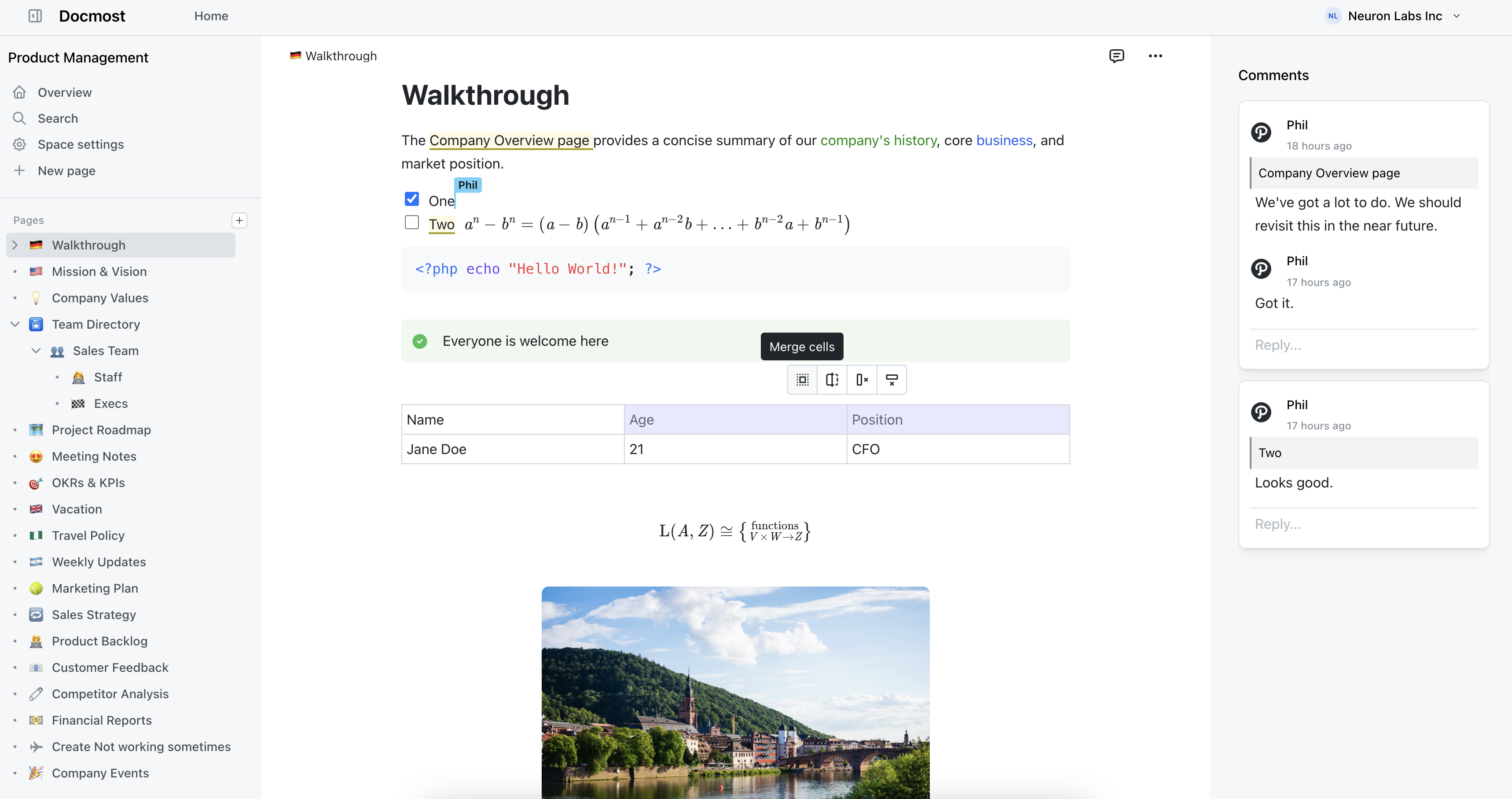
Docmost features
- Collaborative Real-time Editor: Work together on pages in real time.
- Diagrams: Built-in support for Drawio, Excalidraw, and Mermaid diagramming tools.
- Spaces: Organize your pages by team, projects, or departments for better collaboration.
- AI: Ask questions across your knowledge base, translate pages, generate summaries, or connect to other systems via MCP.
- Permissions Management: Easily control access to pages with easy-to-understand permissions.
- Groups: Easily grant unified permissions to users via groups.
- Comments: Add inline comments to pages for better communication and feedback.
- Page History: Track changes with a comprehensive version history.
- Nested Navigation: You can nest and reorder pages via the sidebar.
- Search: Quickly find the information you need with powerful search capabilities.
- File Attachment: Attach files to your pages for quick reference and sharing.
- Attachments search: Full-text search and indexing of content in PDF and DOCX file attachments.
- Embeds: Embed content from Airtable, Loom, YouTube, and more.
- Authentication: Email and password, LDAP and SSO login (SAML/OIDC) in the Enterprise edition.
2. AppFlowy
AppFlowy goes local-first. Built with Flutter and Rust, it's an open-source Notion alternative where your data lives on your device by default instead of someone else's cloud.
That local-first design means you get real offline support, which Outline just doesn't have. AppFlowy has a block-based editor with databases, kanban boards, calendars, and checklists. The interface feels more like Notion than a traditional wiki, so it works better for teams that want project management mixed in with their docs.
Pros:
- Actually works offline, not just a PWA that needs a connection
- Built with Rust, so it's fast even on low-end hardware
- Open source under AGPL-3.0
- Notion-style blocks with databases, kanban boards, and calendars
Cons:
- Real-time collaboration still has sync issues
- No version history, despite being requested since 2023
- Self-hosting the server side is complex
3. Affine
Affine puts documents and whiteboards in the same workspace. If your team currently bounces between a wiki and something like Miro or FigJam for visual thinking, Affine tries to kill that split.
The edgeless canvas mode lets you mix rich text, sticky notes, databases, embedded web pages, shapes, and slides on one surface. Switch to page mode for a more traditional document editor. It's local-first with offline support, which already puts it ahead of Outline. Desktop apps cover macOS, Windows, and Linux.
If your team thinks visually and wants brainstorming and documentation in one place, Affine is worth trying.
Pros:
- Documents and whiteboards in one tool, no context switching
- Local-first with full offline support
- Desktop apps for macOS, Windows, and Linux
- Features actually work instead of sitting on a roadmap
- Clean interface that feels modern without being fussy
Cons:
- Server components are proprietary, so you can't fully self-host
- Fewer integrations
- Still under active development
4. Nuclino
Nuclino stands out for its clean interface, straightforward navigation, and speed. Pages load almost instantly, and there's basically no setup to worry about. If you like Outline's clean design but want something even simpler, Nuclino is that.
You can view content as a list, kanban board, table, or a graph that shows how pages link together. The editor supports Markdown, real-time collaboration, and inline embeds.
The trade-off is flexibility. Nuclino is cloud-only with no self-hosting option, which rules it out for teams that need data on their own servers.
Pros:
- Fast. Pages load almost instantly
- Multiple views: list, board, table, and graph
- Real-time collaboration that just works
Cons:
- No self-hosting, cloud only
- Limited customization and theming
- Not great for large-scale documentation with complex permissions
- Pricing adds up for bigger teams
5. Notion
Notion barely needs an introduction. It's the tool that Outline, AppFlowy, and half the productivity space are chasing. Wikis, project management, databases, notes, all in one workspace that bends to fit almost any workflow.
The block-based editor handles linked databases, toggle lists, synced blocks, embeds, and more. There are templates for everything. Integrations cover Slack, GitHub, Jira, Figma, Google Drive, and dozens of others.
If you want one tool for knowledge management and project tracking, Notion has the widest range of any option here.
Pros:
- Does more than anything else on this list, and it's not close
- Block-based editor is very flexible
- Huge template library and active community
- Integrations with most of the tools you already use
Cons:
- Cloud-only, your data lives on Notion's servers
- Performance gets sluggish in large workspaces with lots of linked databases
- Overkill when all you need is a wiki
- Offline mode exists but don't count on it
6. BookStack
BookStack goes the other direction from most modern wiki tools. Instead of freeform pages and nested hierarchies, it enforces a fixed structure: Shelves contain Books, Books contain Chapters, Chapters contain Pages. That sounds rigid, and it is, but for teams that need predictable organization it works surprisingly well.
It's built with PHP and Laravel, fully open source under the MIT license, and easy to self-host. A basic LAMP stack is all you need. The editor has WYSIWYG and Markdown modes, with Draw.io for diagrams. 30+ languages, granular role-based permissions, full-text search.
BookStack won't win design awards, and it doesn't have real-time collaboration. But it's stable, well-documented, and has shipped consistent monthly releases since 2015. If you want a self-hosted wiki that just works and stays out of your way, it's hard to do better.
Pros:
- MIT licensed and fully open source
- Simple to self-host, just a LAMP stack
- The fixed structure keeps documentation organized as it grows
- WYSIWYG and Markdown editors with Draw.io
- Great documentation and consistent monthly releases
- 30+ languages out of the box
Cons:
- No real-time collaboration
- The Shelf/Book/Chapter/Page hierarchy won't suit every team
- Interface looks dated
- Fewer integrations than newer tools