Best 5 BlueSpice Alternatives
BlueSpice started as a good idea. Take MediaWiki, the engine behind Wikipedia, and make it usable for companies. Add a visual editor, better permission controls, some enterprise features on top. In theory, you get Wikipedia's reliability with a modern coat of paint.
In practice, you still get MediaWiki underneath. And that's where the problems start. We even wrote about the Best 7 Mediawiki Alternatives.
BlueSpice inherits everything that makes MediaWiki frustrating for teams that aren't running an encyclopedia. The wiki markup syntax that nobody outside of Wikipedia contributors actually wants to learn. The permission system that requires a manual to configure. Extensions that break when you update. A mobile experience that feels like an afterthought, because it is one.
If you're reading this, you've probably already hit one or more of those walls. Maybe your team stopped contributing because the editor felt clunky. Maybe you spent a week trying to get SSO working. Maybe you're just tired of maintaining a PHP stack that requires constant attention.
Whatever brought you here, these are five alternatives worth looking at.
Docmost
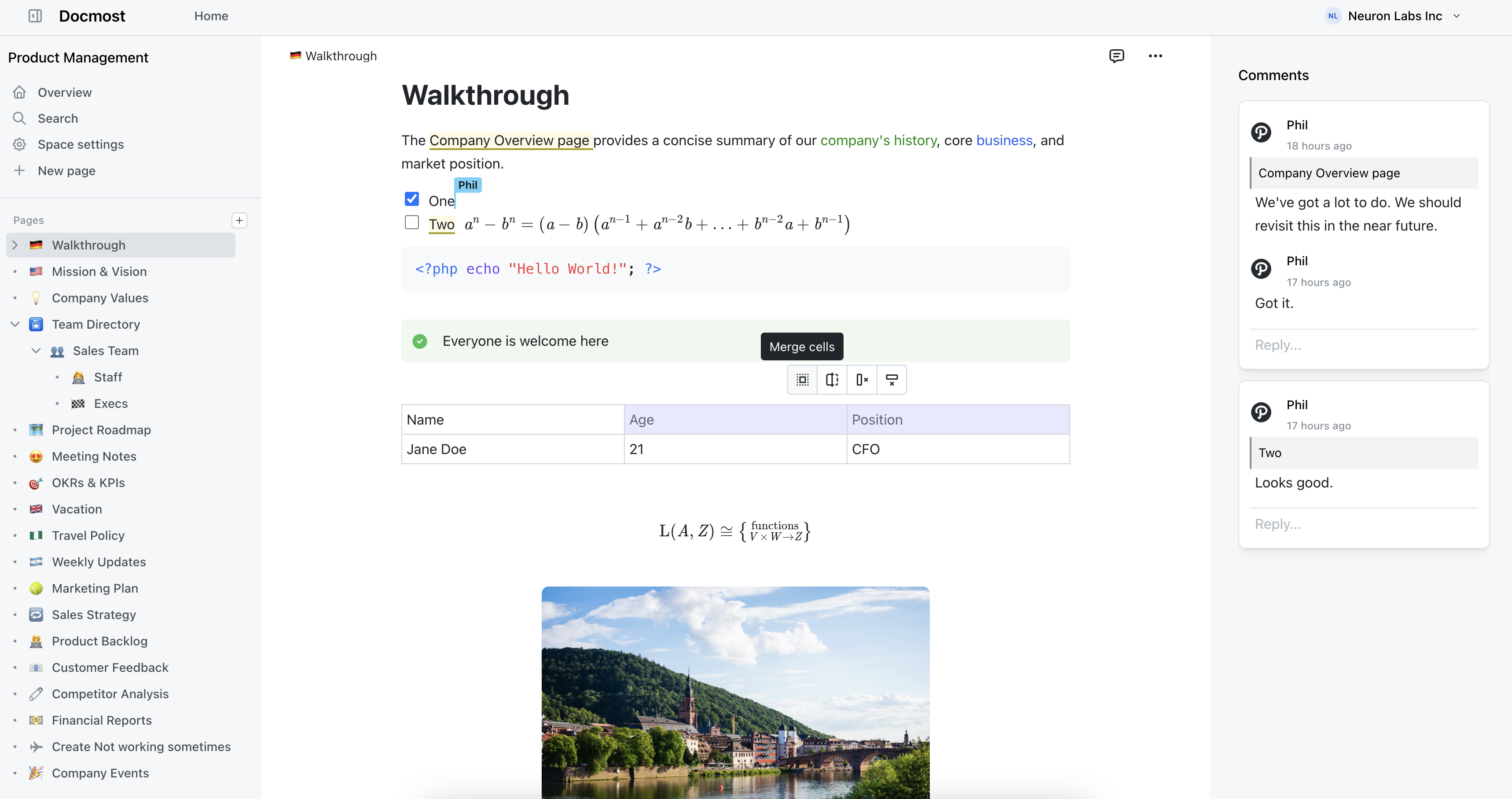
Docmost is a powerful enterprise-ready wiki built for teams that need to write and organize documentation together, without fighting the tool to do it.
It's self-hosted, so your data stays on your servers.
The editor is the first thing people notice. It's a proper block-based rich text editor, closer to what you'd expect from Notion or Google Docs than from anything in the MediaWiki family. No markup syntax. No switching between edit and preview modes. You write, you format, and it works.
Real-time collaboration is built in. Multiple people can edit the same page at the same time and see each other's changes as they happen. If you've ever dealt with MediaWiki's edit conflicts, where two people save at once and someone loses their work, this alone might be enough reason to switch.
Beyond the editor, Docmost organizes content into spaces with nested pages, which gives you a clear hierarchy without the flat-page chaos that plagues most wikis at scale. Permissions are handled at the space and group level, so you don't have to configure access page by page.
It also ships with built-in diagramming tools (Draw.io, Excalidraw, and Mermaid), inline comments, page history, file attachments, and search that actually works across your whole workspace. Authentication covers the enterprise basics: SSO, LDAP, and standard email/password.
Docmost features
- Collaborative Real-time Editor: Work together on pages in real time.
- Diagrams: Built-in support for Drawio, Excalidraw, and Mermaid diagramming tools.
- Spaces: Organize your pages by team, projects, or departments for better collaboration.
- Permissions Management: Easily control access to pages with easy-to-understand permissions.
- Groups: Easily grant unified permissions to users via groups.
- Comments: Add inline comments to pages for better communication and feedback.
- Page History: Track changes with a comprehensive version history.
- Nested Navigation: You can nest and reorder pages via the sidebar.
- Search: Quickly find the information you need with powerful search capabilities.
- File Attachment: Attach files to your pages for quick reference and sharing.
- Attachments search: Full-text search and indexing of content in PDF and DOCX file attachments.
- Embeds: Embed content from Airtable, Loom, YouTube, and more.
- Authentication: Email and password, LDAP and SSO login (SAML/OIDC) in the Enterprise edition.
- AI: built-in AI assistant, search, drafting, summarizing, and translating.
BookStack
BookStack takes the opposite approach from XWiki. Instead of giving you maximum flexibility, it gives you a fixed, opinionated structure and makes it dead simple to use.
Content is organized into three levels: shelves, books, and chapters containing pages. That's it. You don't decide how to structure things. The structure is already decided. For teams that struggled with BlueSpice because nobody could agree on how to organize content, this constraint is actually a relief.
The editor is clean and straightforward. No wiki markup. Search works well even with large collections of pages. And the permissions model, while not as granular as XWiki's, covers what most teams need without requiring an admin to spend a day configuring it.
BookStack supports authentication through providers like Okta, Google, GitHub, and LDAP. It runs on PHP and MySQL, so the hosting requirements are modest. It installs in minutes, not hours.
The limitation is in its rigidity. The books-and-chapters model works great for documentation, manuals, and knowledge bases. It works less well if you need something more flexible, like a project wiki where content doesn't fit neatly into "books."
Wiki.js
Wiki.js is a Node.js-based wiki that was built from scratch as a modern alternative to the older PHP wikis. It's fast, it looks good out of the box, and the installation process through Docker is about as painless as self-hosted software gets.
The editor supports Markdown and visual editing. It works with multiple databases (PostgreSQL, MySQL, MariaDB, SQLite, and MS SQL), which gives you flexibility in how you deploy it. Authentication has wide coverage, including GitHub, Google, Microsoft, LDAP, and SAML.
Search is handled through a built-in engine with optional Elasticsearch integration for larger deployments. The permission system is role-based and reasonably flexible without being overwhelming.
One thing to know: Wiki.js 3.0 has been in development for a long time. The current stable version (2.x) is solid but hasn't seen major updates recently. Whether that's a concern depends on your tolerance for projects with uncertain timelines. The existing feature set is complete enough for most use cases, but if you need something that's actively shipping improvements, it's worth factoring in.
AppFlowy
AppFlowy is the wildcard on this list. It's not a traditional wiki. It's an open source workspace that combines documents, databases, and kanban boards in one tool, closer to Notion than to anything in the wiki category.
The editor is block-based with drag-and-drop support. You build pages by stacking content blocks: text, images, tables, databases, boards. There's no markup language to learn. If your team bounced off BlueSpice because the editing experience felt dated, AppFlowy will feel like a different planet.
It works offline by default and syncs when you reconnect, which is unusual for self-hosted tools. There are native desktop apps for macOS, Windows, and Linux, so you're not limited to the browser.
The trade-off is that AppFlowy is younger than the other tools on this list and the feature set is still growing. It doesn't have the deep wiki-specific features you'd find in Docmost or XWiki, like granular space-level permissions or advanced search filtering. It's better thought of as a general-purpose workspace that can function as a wiki, rather than a purpose-built wiki.
XWiki
XWiki is the one you look at when your requirements are long and specific. It's a Java-based open source wiki that has been around since 2004, and it leans hard into customization.
Where most wikis give you a fixed set of features, XWiki gives you a platform you can build on. There's an extension ecosystem with hundreds of plugins, and the application development framework lets you create custom workflows, forms, and structured data within the wiki itself. If you need a wiki that also functions as a lightweight internal app platform, XWiki can do that.
It supports WYSIWYG editing, Markdown, and traditional wiki syntax, so different users can work however they prefer. Access controls are granular. Page organization is hierarchical with nested spaces.
The trade-off is complexity. XWiki is powerful, but it has a steep learning curve and demands more from whoever is running it. Installation, configuration, and ongoing maintenance require real technical effort. The interface has improved over the years, but it still feels more like an enterprise tool than a consumer product, for better and worse.
Which one replaces BlueSpice?
That depends on what drove you away from it.
If the core problem was the editing experience and collaboration, Docmost is the most direct upgrade. You get a modern editor, real-time co-editing, and a clean organizational structure without the MediaWiki baggage.